
Day 1 Online Training

Begin Cashier Training

Narration begins after you start the training.

Training Portal
Use this on a tablet, office computer, or training station. Browser audio rules require this first click before narration can start.
Launch Family Entertainment
Back to Day 1 MenuTraining Portal
Slide 1 / 14
Day 1 Module

Front End Starts the Experience

Cashier Training
Your job is not just to sell admission.

You set the tone for the guest's entire visit.
Slide 1 Narration
Narration locked until training starts.

Today’s focus

  • Greeting guests quickly and professionally
  • Using positive body language
  • Understanding waiver rules
  • Directing guests through the waiver process
  • Knowing when to ask for help
Manager note: This presentation should be completed before the employee begins Day 1 floor training.

Your RoleAt Check-In

You are responsible for:
  • Creating a positive first impression
  • Greeting guests professionally
  • Supporting guest safety
  • Managing waiver procedures
  • Keeping check-in organized
  • Starting every visit the right way
The front desk sets the tone for the entire Launch experience.
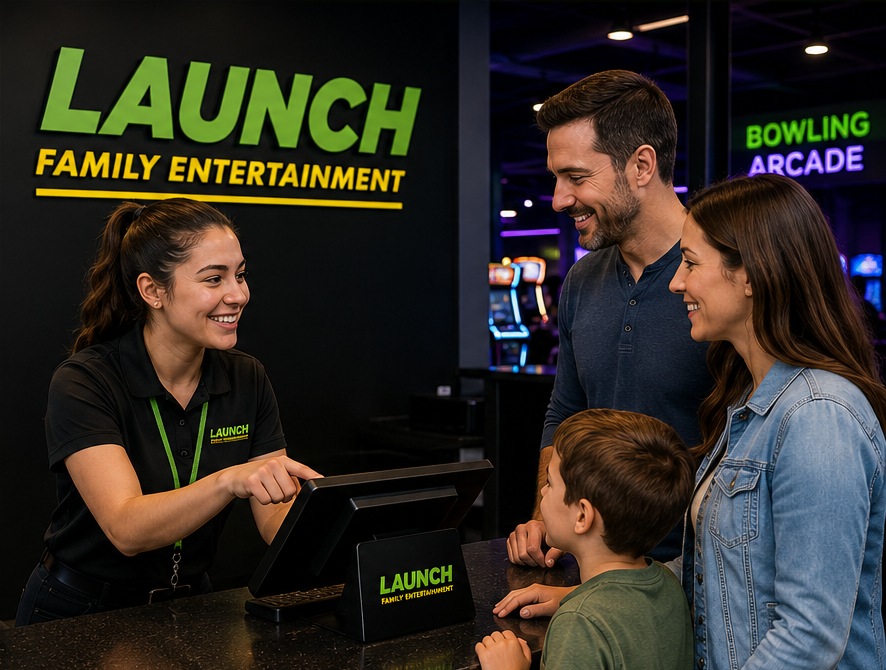
Cashier assisting guests at check-in
Narration will play automatically.
Greeting Standard

The 10-Second Rule

Required
10 Seconds or less

Every guest should be acknowledged within 10 seconds of entering the facility.

During busy periods:
Acknowledgment can be verbal or non-verbal.
👁Eye contact
A wave
A smile
A quick nod
!Standard: acknowledgment is required even during busy periods.
Narration will play automatically.

If you are already helping someone:

“Hi! Welcome to Launch.
I’ll be with you shortly.”
A quick acknowledgment tells the guest: “I see you, and help is coming.”
Standard: verbal or non-verbal acknowledgment is required within 10 seconds.
Guest Script

Start Every Interaction Correctly

Script
Hello! Welcome to Launch!
Have you been here before?
Speak clearly, smile naturally, and maintain eye contact.
If yes: Returning Guest
1
👥
Welcome them back.
2
Confirm waiver status. Ask if they have completed a waiver within the last year.
3
Verify waiver within the last year.
4
Proceed with the standard check-in process.
Cashier greeting family at check-in
!

Waiver Requirement

All guests entering the facility must have a valid waiver on file.

This includes participants, spectators, parents, and minors.

Narration will play automatically.
Manager note: have the trainee practice this script out loud before floor training.
Hospitality Standard

Positive Guest Interaction

Behavior
Every guest interaction shapes the experience at Launch. Use these behaviors to create a welcoming, safe, and memorable visit for every guest.
👀

Maintain Eye Contact

Look at the guest while speaking and listening.

It shows you are engaged and attentive.

🎯

Stay Focused

Give the guest your full attention.

Avoid distractions and multitasking.

🙂

Positive Body Language

Smile, use open posture, and keep your tone friendly.

Your body language should match your words.

🗣️

Use Guest Names

Use a guest’s name whenever possible.

It creates a personal and welcoming experience.

🧒

Acknowledge Children

Engage children as part of the family experience.

A smile, greeting, or friendly comment can build excitement.

Consistent positive interactions build trust, increase guest satisfaction, and reflect the Launch difference.
Narration will play automatically.
Manager note: These behaviors should be observed during the Day 1 shift.
Behaviors That Hurt

The Guest Experience

Professionalism
!
Guests notice your attitude, body language, and professionalism at all times. These behaviors can create a negative experience and reflect poorly on Launch.
Body Language
Crossed armsCan appear closed off or unapproachable.
No eye contactCan make guests feel ignored or unimportant.
Visible frustrationHuffing, pouting, or reacting negatively creates a poor atmosphere.
Professional Conduct
Eating or chewing gumCan appear distracted or unprofessional.
Talking to coworkers while helping a guestDivides your attention and makes the guest feel less important.
Guest Service
Ignoring a guestGuests should never feel invisible or overlooked.
Guessing instead of asking for helpCan lead to incorrect information and poor guest experiences.
Never guess if you are unsure. Ask a supervisor or manager for help.
Narration will play automatically.
Manager note: this slide should be reinforced during live observation.
Compliance

Waiver Rules

Every Guest
Every guest entering the facility must have a valid waiver on file. This includes participants, spectators, parents, guardians, and minors.
👨

Adult Participants

Adults complete and sign their own waiver before admission.

👶

Minor Participants

Minors require a waiver completed by a parent or legal guardian.

👨‍👩‍👧

Parents / Guardians

Parents and guardians must also complete waiver verification when entering.

🪑

Non‑Participants

Spectators and non-jumpers still require waiver verification.

Narration will play automatically.
Important: non-jumpers still require waiver verification.
Process

Completing a Waiver

Guest Action
Approved Waiver Methods
🖥️
Waiver Kiosk Guests may complete waivers at approved waiver stations.
📱
Guest Smartphone Guests may complete waivers on their own personal device.
🌐
Park Website Waivers may also be completed online before arrival.
🔳
QR Code Station QR codes may direct guests to the waiver page.
Never Do This
Employees may NEVER complete a waiver for a guest.
  • Do not type information for them
  • Do not click or submit the waiver
  • Do not sign for a guest
  • Do not complete waivers for friends or family
Narration will play automatically.
This should be treated as a hard rule, not a customer service preference.
Verification

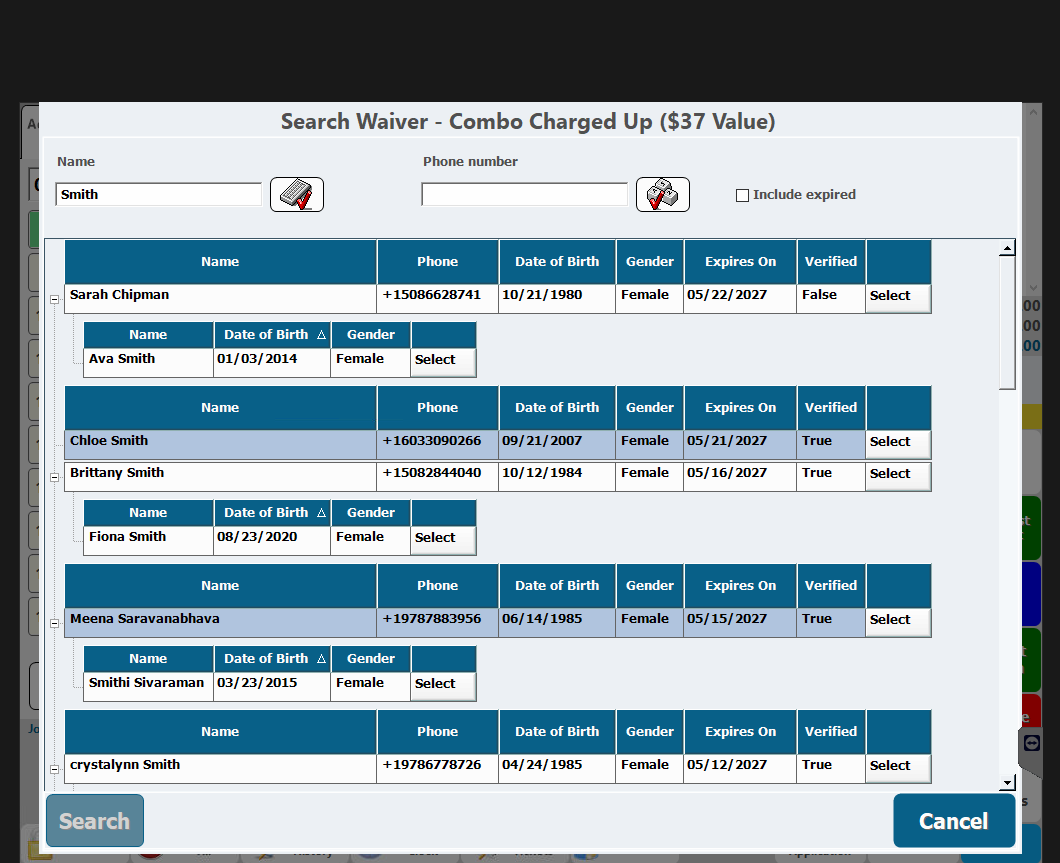
Waiver Search & Verification

CenterEdge
Phone number searches are usually faster and more accurate than searching by last name.
TRUE = Previously Verified
FALSE = ID Verification Required
Example waiver search results showing both verified and unverified guests.
1
Search the waiver Use the guest phone number whenever possible.
2
Review guest details Confirm the correct guest, date of birth, and linked children.
3
FALSE = Verify ID Check a valid ID before proceeding.
4
Select the waiver Clicking “Select” after ID verification changes the waiver to VERIFIED.
5
Attach correctly Always attach the correct waiver to the correct transaction.
Expired Waiver? Guest completes a new waiver and returns directly to the same cashier.
Narration will play automatically.
Never attach the wrong waiver to a guest transaction.
Practice Scenarios

Common Day 1 Guest Situations

Role Play
Stay calm, professional, and confident when explaining waiver requirements.
🗣️ Guest Says:
“I filled this out last year.”
“I’m not jumping.”
“Can you just do it for me?”
“Why does everyone need one?”
Best Practice Response:
“Let me verify that for you in the system.”
“All guests entering the facility require a waiver.”
“I’m unable to complete the waiver on your behalf.”
“If needed, I can get a manager to assist further.”
Managers should role-play at least two scenarios before the employee begins live guest interaction.
Narration will play automatically.
Safety Policy

Launch Grip Sock Policy

Required
Launch Sock Policy
All participants must wear approved Launch Grip Socks on attractions.
✓ Launch socks are required for participation
✓ Cashiers must visually confirm the socks
✕ Competitor grip socks are NOT permitted
✕ Personal socks are NOT permitted
✓ Guests may reuse Launch socks on future visits
Cashier Script:
“Do you have your Launch Grip Socks today?”
Playing required narration...
Guest Questions

Sock FAQs & Escalation

FAQ
“Why can’t I use competitor socks?”
Launch requires approved socks for safety, consistency, and attraction standards.
“Buying socks is a scam.”
Remain calm, explain the policy briefly, and avoid arguing with the guest.
“You don’t have my size.”
Ask a supervisor or manager for assistance before escalating the situation.
Important: If a guest becomes upset about the sock policy, calmly explain the rules and involve a manager early.
Playing required narration...
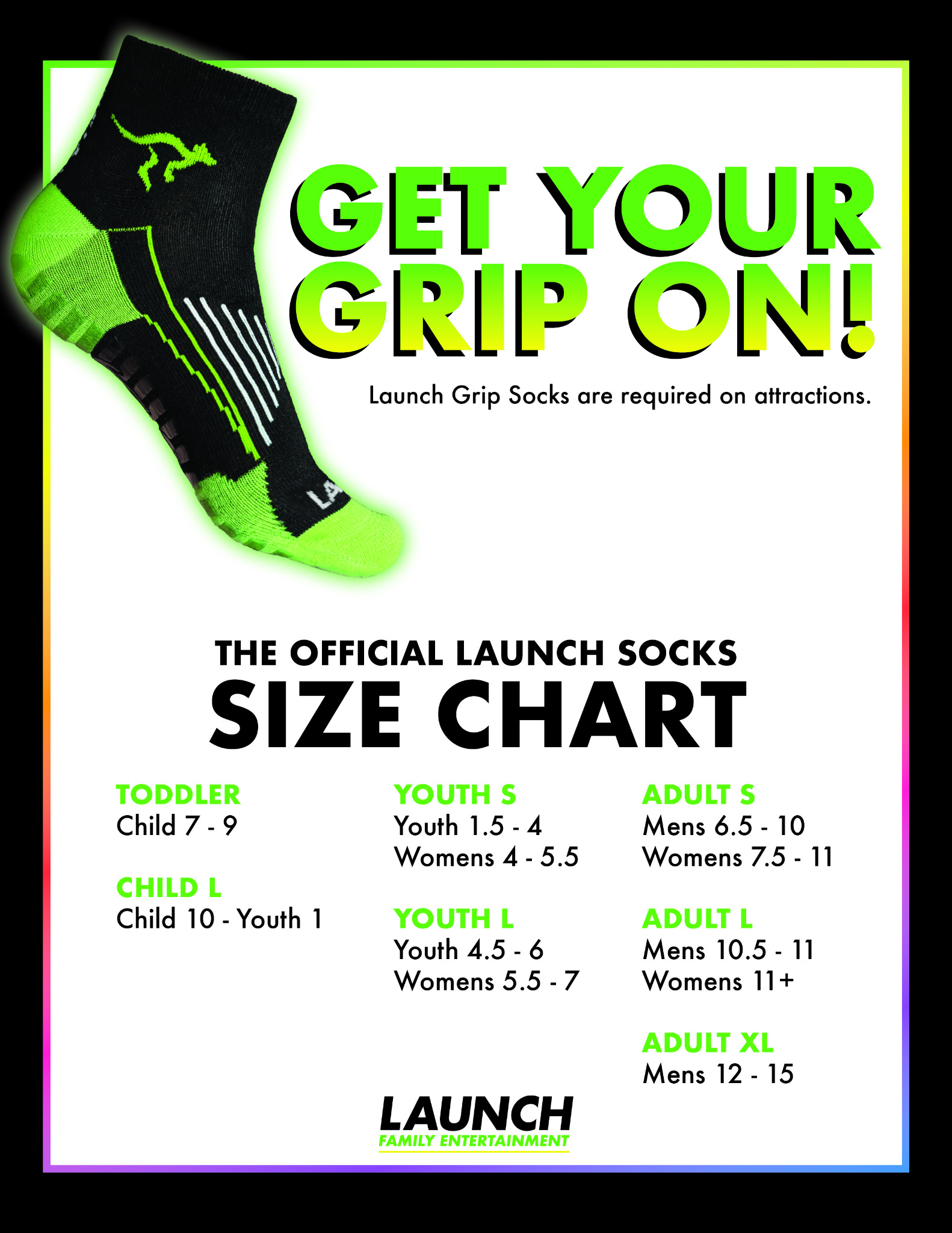
Launch Sock Size Chart
Day 1 Standards

Key Expectations

Checklist
READY FOR FLOOR TRAINING
Greet every guest within 10 seconds.
Use eye contact, positive posture, and clear communication.
Verify that every guest has a valid waiver.
Never complete a waiver for a guest.
Ask a manager or knowledgeable employee when unsure.
These standards apply during every shift, not just training.
Narration will play automatically.
DAY 1 WRAP UP

Next Steps

CHECKLIST
1

Print Today's Checklist

Return to the Day 1 menu and print the cashier training checklist before floor training begins.

2

Complete Supervised Floor Training

Work the shift alongside a trainer or manager and review waivers, socks, guest interaction, POS basics, and escalation procedures.

3

Complete the Day 1 Exam

After hands-on training is complete, return to the training menu and complete the Day 1 cashier exam.

Manager note: The employee should not complete the Day 1 exam until all checklist items and floor training have been completed.
Playing required narration...

Speaker / Narration Script