
Give More Value.
Sell With Confidence.
Learn the holiday promotion, execute it accurately, and give every guest a clear explanation of what they receive.
An Experience Gift.
With Added Value.
Holiday gift card promotions run through November and December, giving guests an easy experience-based gift and additional value for a future visit.
Make the Offer
Easy to Understand.
Accuracy at the counter protects the guest experience and makes the promotion easy to use later.
Know It.
Process It.
The first part of training focuses on the offer itself and the transaction at the front counter.
Know What Happens
After the Sale.
You also need enough knowledge to answer questions about the other pieces connected to the holiday promotion.
The Offer Is
Not Park-Editable.
This promotion is being run nationally. Individual parks follow the approved gift card offer and promotional values.
Clear. Accurate.
Confident.
You should be able to guide the guest through the promotion from the initial explanation through the completed sale.

Three Offers.
One Holiday Promotion.
The same three gift card offers remain in place throughout November and December.
Buy a $30 Gift Card
The promotional value is added separately for the guest.
Buy a $50 Gift Card
The promotional value grows with the qualifying gift card purchase.
Buy a $125 Gift Card
This is the highest-value promotional gift card offer.
Marketing Changes.
The Offers Do Not.
November 1
Through December 31
The approved Q4 gift card promotion runs for both full months.
The Purchased Gift Card
Can Be Used Right Away.
Do not make the guest wait until January to use the value they actually purchased.
Bonus Value
Is Separate.
The purchased gift card and promotional Bonus Value follow different rules.
Gift Card
≠ Bonus Value
These two values are connected to the same promotion, but they are not the same thing.
The guest receives the value they actually purchased for immediate use.
The extra promotional value follows its own redemption rules.
The Full Purchased Value
Is Available Immediately.
This is the amount the guest actually pays for. It works like a normal Launch gift card and does not wait until January.
Extra Value.
Available January 1.
Bonus Value is promotional value received in addition to the gift card purchase. It cannot be redeemed before January 1, 2027.
A $30 Purchase
Creates Two Values.
The guest gets the value they bought now, plus separate promotional value for later.
Keep the
Bonus Value Pass.
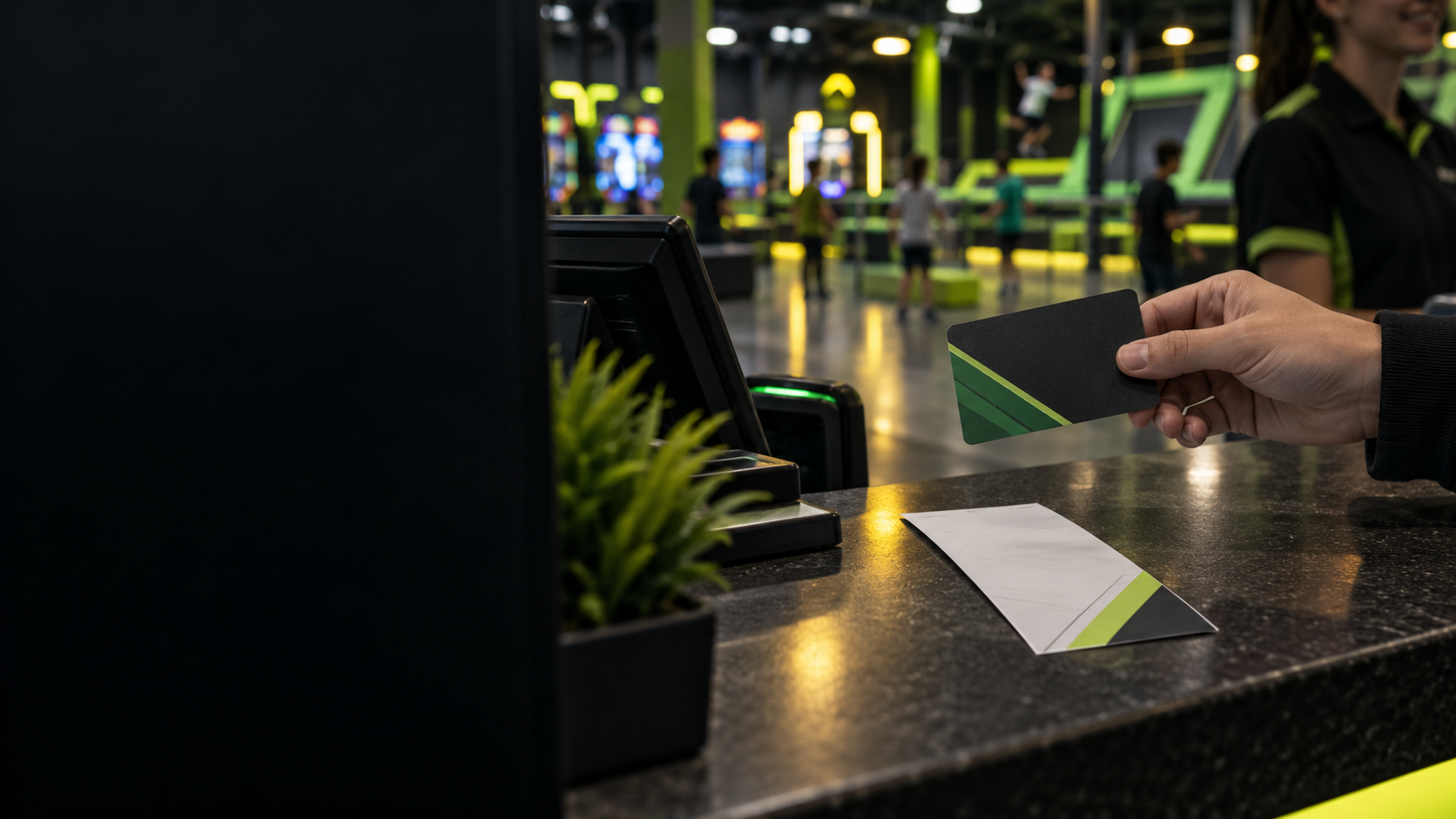
The in-store transaction prints a separate barcode/pass for the promotional Bonus Value. Remind the guest to keep it until they redeem it.
Start at the
Purchase Location.
Beginning January 1, the Bonus Value must first be redeemed at the Launch location where the qualifying gift card was purchased.
Redeem the Bonus Value pass here first.
Once loaded, the card can be used at any Launch.
Loaded to a Gift Card.
Then Use It Anywhere.
Once the Bonus Value has been converted and loaded onto a physical gift card, that card may be used at any Launch location.
Remember
Now vs. Later.

Lucky Launcher
Prize Tickets
An additional benefit for qualifying in-store holiday gift card purchases.
$50+ Total in Gift Cards
Purchased In-Store
The total gift-card value in the transaction determines eligibility. Multiple gift cards can combine to reach the threshold.
PER TRANSACTION$50, $100, $250 or more in gift cards still earns a maximum of one ticket.
No Ticket For
A Single $30 Card or Online
A single $30 gift card does not qualify. Two $30 cards in the same transaction do.
Online promotional gift card orders do not include Lucky Launcher.
What Can They Win?
Prize types vary by ticket.
Prize Ticket ≠ Bonus Value
Lucky Launcher Tickets
While Supplies Last.
Remember the
Lucky Launcher Formula.

Explain It
Clearly.
Knowing the promotion is only part of the job. The guest needs an explanation that is easy to understand.
Four Steps.
One Clear Flow.
Use the same simple framework throughout the guest conversation.
Call Out Lucky Launcher.
Online Orders
Do Not Qualify.
Tell Them What to Keep.
Keep It
Clear and Simple.
Present the offer, clarify the timing, call out the additional benefit, and confirm the guest understands what they are receiving.
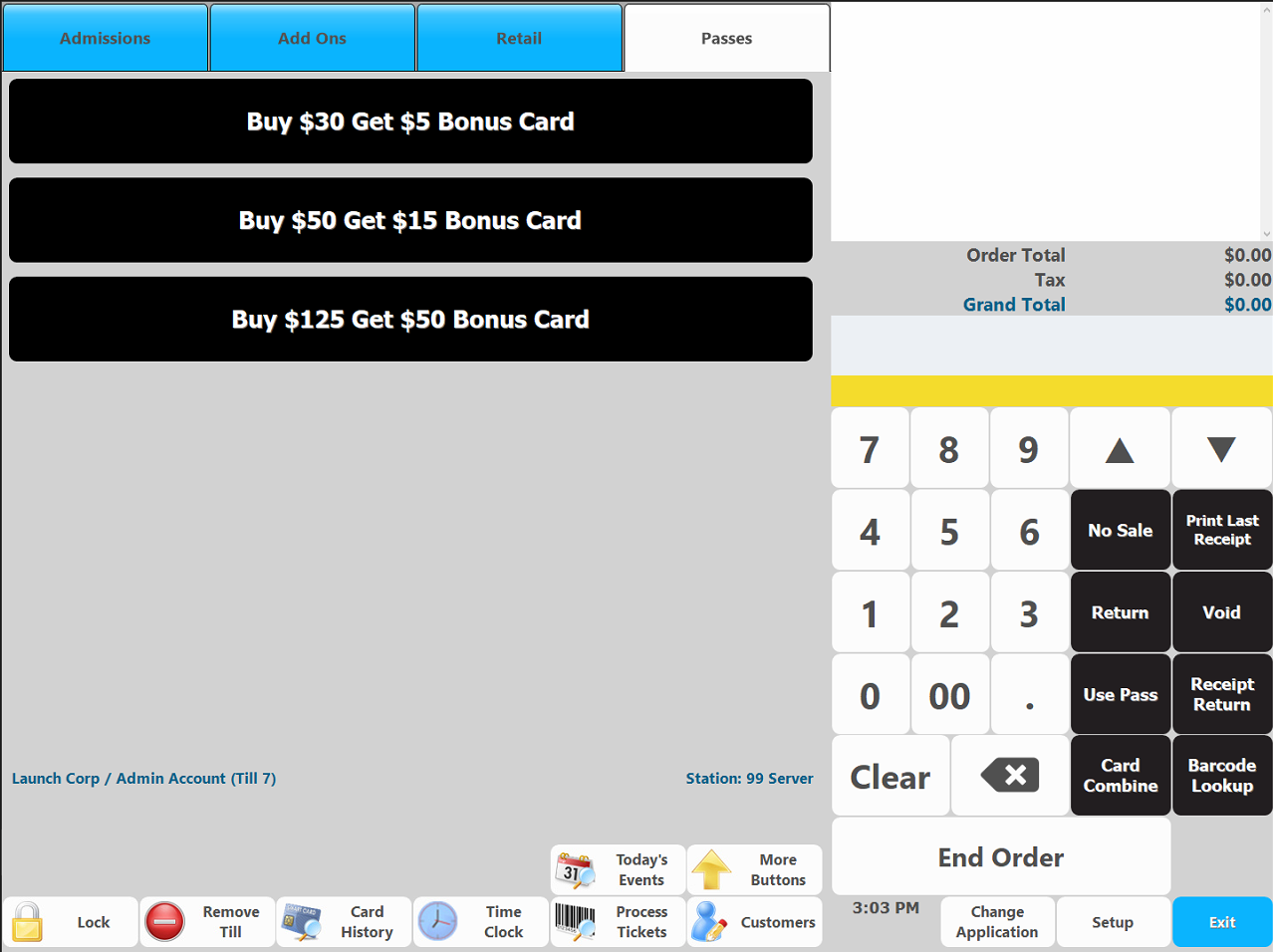
Ring the Holiday
Gift Card Correctly.
This slide walks through the exact button path for the promotional gift card sale.
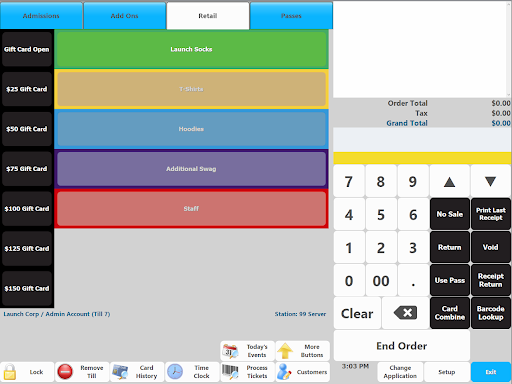
Do Not Use the Regular Gift Card Buttons.
Select the Offer That Matches the Purchase.
Either Choice
Works the Same.
A modifier screen appears after the promotional offer is selected. Select either Bonus Value option shown.
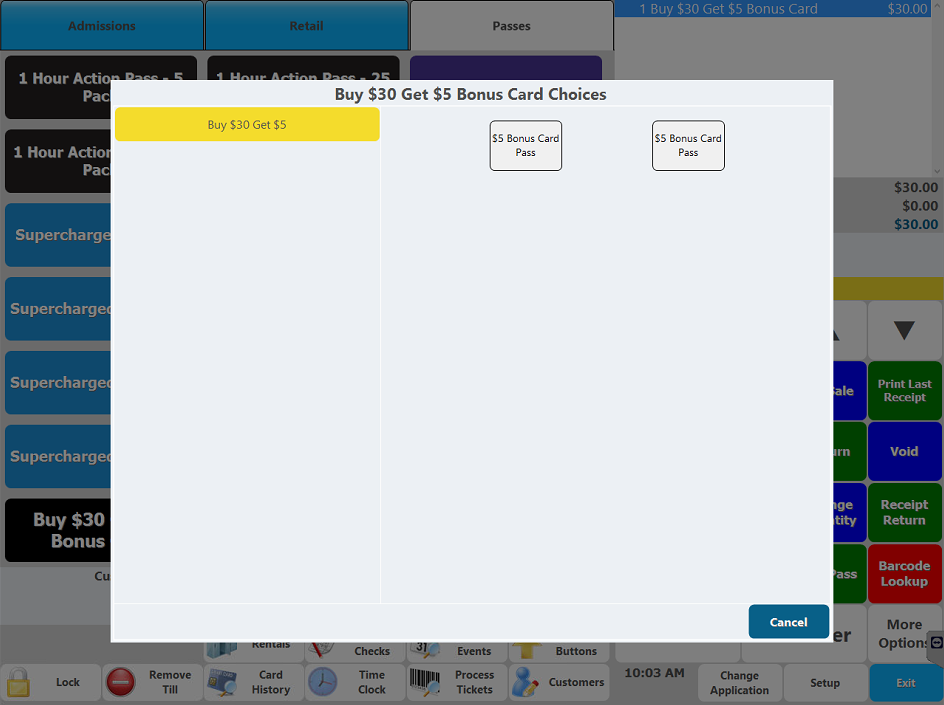
Choose End Order.
Process Payment. Then
Complete The Order.
Next: Load the
Purchased Gift Card.
The payment portion is complete. The gift card loading process continues on the next slide.
Keep the Transaction
In the Correct Order.
Load the Card.
Hand Off Everything.
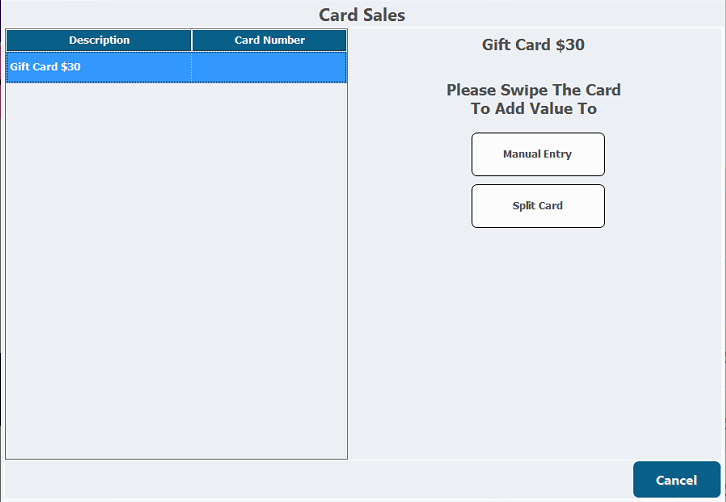
Swipe the
Physical Gift Card.
Load the amount the guest actually purchased onto the physical gift card.
The Value They Bought
Is Ready Immediately.
The purchased gift card does not wait until January. Once loaded, the guest can use that purchased value right away.
A Separate Pass
Prints for Bonus Value.
The receipt materials include a barcode/pass used to redeem the promotional Bonus Value.
Bonus Value Pass
Bonus Value Pass
Do Not Let This
Get Thrown Away.
Tell the guest to keep the Bonus Value barcode/pass until they are ready to redeem it.

Check the Transaction
Before the Handoff.
If the total gift-card purchase is $50 or more, give the guest one Lucky Launcher Prize Ticket, while supplies last.
Make Sure They Have
Everything They Need.
 Loaded Gift CardAvailable immediatelyLucky Launcher Ticket$50+ total in-store · max 1 per transaction
One Order.
Several Separate Emails.
Online orders can create multiple messages, and each one serves a different purpose.
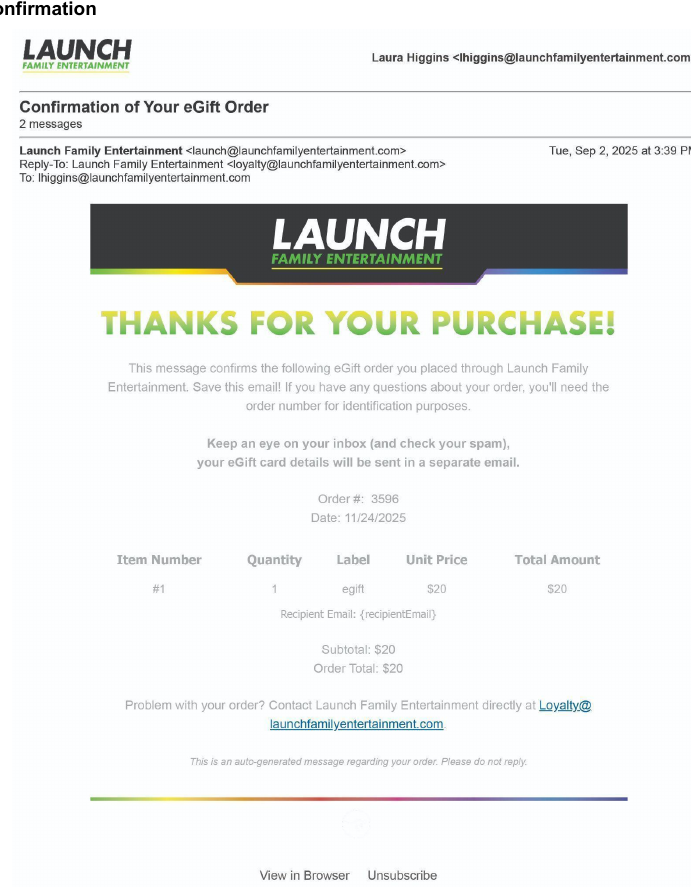
The Order Is Confirmed.
The Card Number Is Not Here.
This message confirms the online purchase was completed.
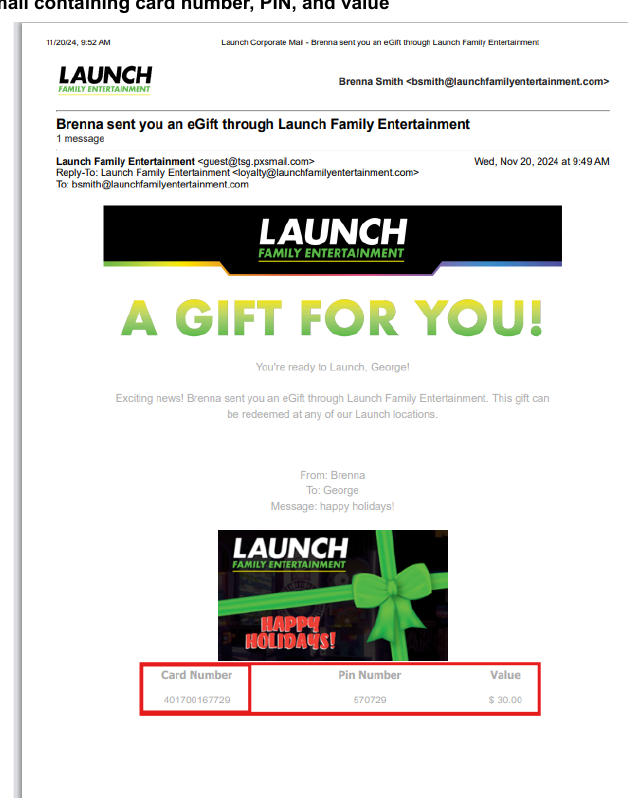
This Is the
Usable Gift Card.
The actual gift card email contains the card number, PIN, and purchased value.

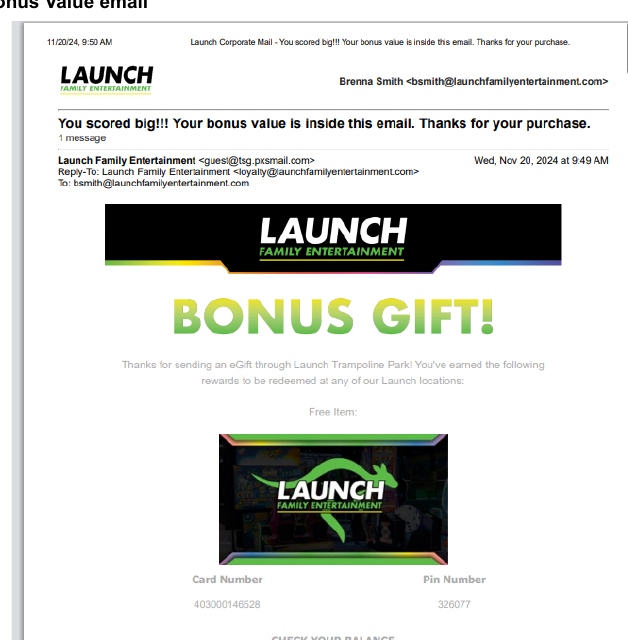
Bonus Value
Arrives Separately.
JAN. 12027 · Redemption beginsKnow Where the
Bonus Value Goes.
Multiple Emails
Can Still Equal $50.
A qualifying $125 purchase may generate more than one Bonus Value email or card. That is intentional.
No Lucky Launcher
Prize Ticket Online.
Lucky Launcher Prize Tickets are an in-store benefit only.
Think in
Separate Messages.
Order ConfirmationConfirms the purchase · no usable card numberGift Card EmailPurchased card · available immediatelyBonus Value Email(s)Separate promotional value · January 1Redemption Begins
January 1, 2027.
Holiday promotional Bonus Value cannot be redeemed before this date.
The Printed Pass
Starts at the Purchase Location.
The barcode/pass from an in-store purchase must first be redeemed where that qualifying gift card was purchased.
A Different
Redemption Rule.
If the original gift card was purchased online, the qualifying Bonus Value may be redeemed at any Launch location.
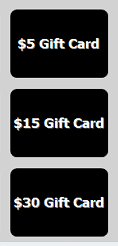
Match the
Bonus Value Amount.
Select the gift card amount that matches the value shown on the guest's Bonus Value pass.
Select
Use Pass.
This opens the pass-redemption workflow.
Select Get Ticket
and Scan the Pass.
Use the barcode from the guest's printed Bonus Value pass.

The Amount Owed
Should Drop to Zero.
Complete These Steps
in Order.
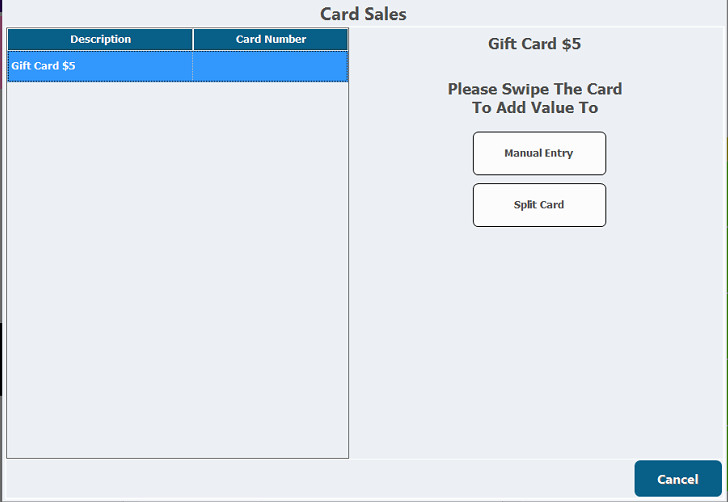
Load the Bonus Value
onto a Physical Gift Card.
Swipe a physical gift card when prompted to add the redeemed promotional value.
Do Not Redeem
Before January 1.
Promotional Bonus Value redemption begins on this date.
Where Can the Bonus Value
Be Redeemed?
Redeem an eGift.
Check a Balance.
These are separate from the promotional Bonus Value redemption process.
Ring the Guest’s Items
and Select End Order.
Start the transaction just as you normally would for the guest’s purchase.
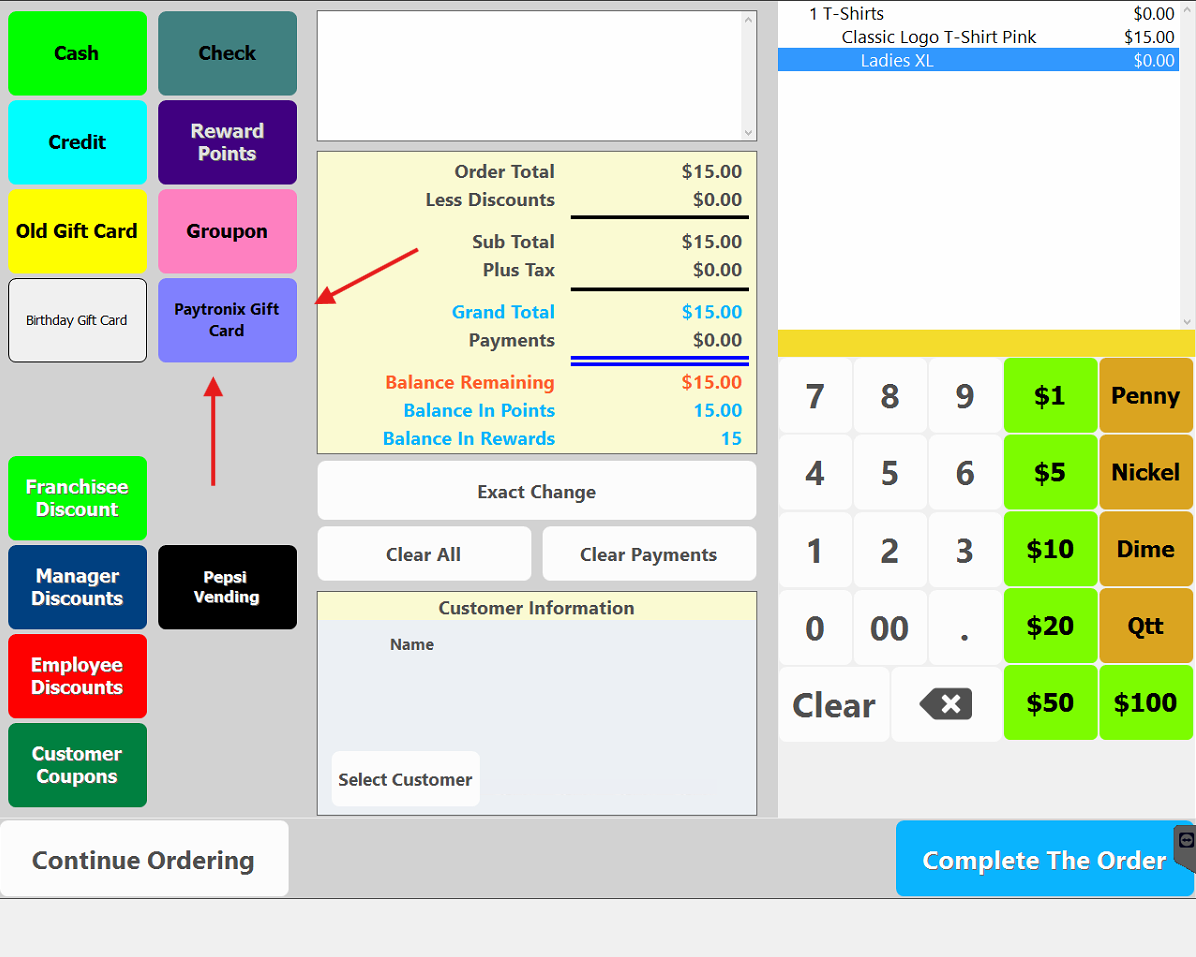
Choose
Paytronix Gift Card.
Select Paytronix Gift Card from the payment screen.
Enter the Gift Card Number
and the PIN Number.
Use the information shown in the guest’s eGift email. Both the card number and PIN are required to complete the transaction.
A Different
Process.
Use the balance-check workflow when the guest only wants to know the remaining value.
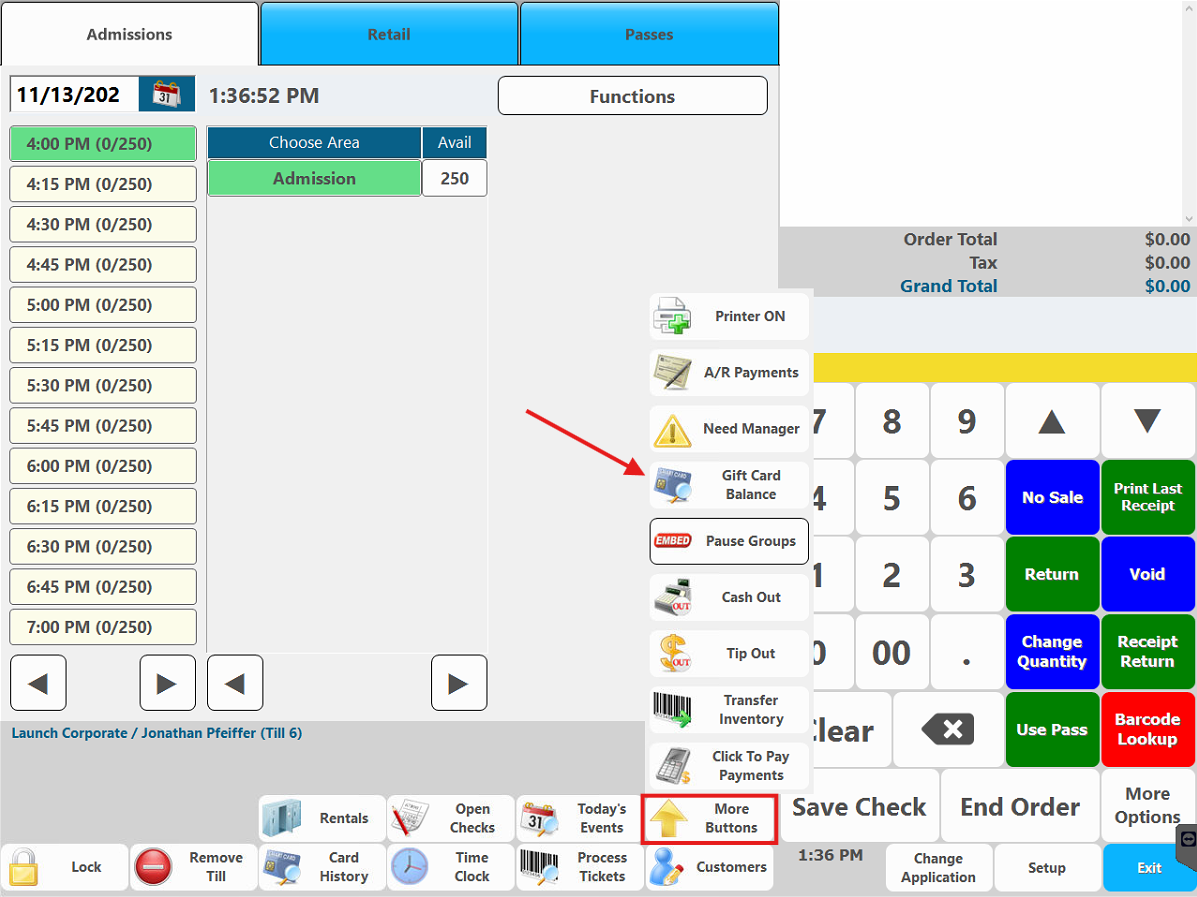
Select More Buttons
Then Gift Card Balance.
This opens the balance lookup process.
Swipe the Card
or Enter the Number and PIN.
When prompted, swipe the physical gift card, or manually enter the card number and PIN.
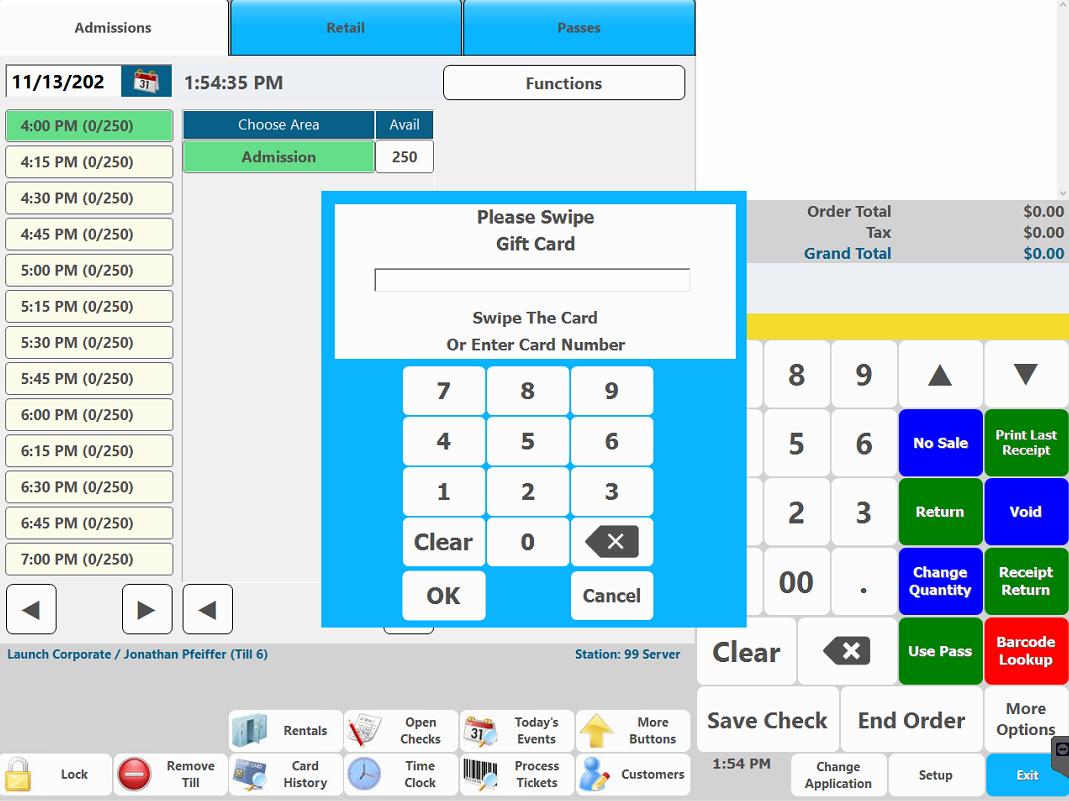
Select OK
to View the Balance.
The guest’s available balance will then be displayed.
Choose the Right Process
for the Guest’s Need.
Support the Guest
Without Guessing.
There is a specific support process to follow when an online gift card email cannot be found.
Check Inbox, Spam
and Junk.
Ask the guest to look for messages from all three approved sending addresses.
Give Support Enough
to Locate the Order.
If the emails cannot be found, collect the information Support will need before escalating the issue.
Send the Details.
Support Locates + Re-Sends.
Send the collected order information to Launch Support so the team can locate and re-send the order.
Set the Guest’s
Expectation.
Let the guest know the re-sent email may not arrive immediately.
This email address can be given directly to the guest if additional follow-up is needed.
Use Service Recovery
When Needed.
This is the recommended service-recovery option while the issue is being resolved, but it is not required at every location.
Follow the direction of your local leadership team. Additional purchases should still be paid for unless local leadership directs otherwise.
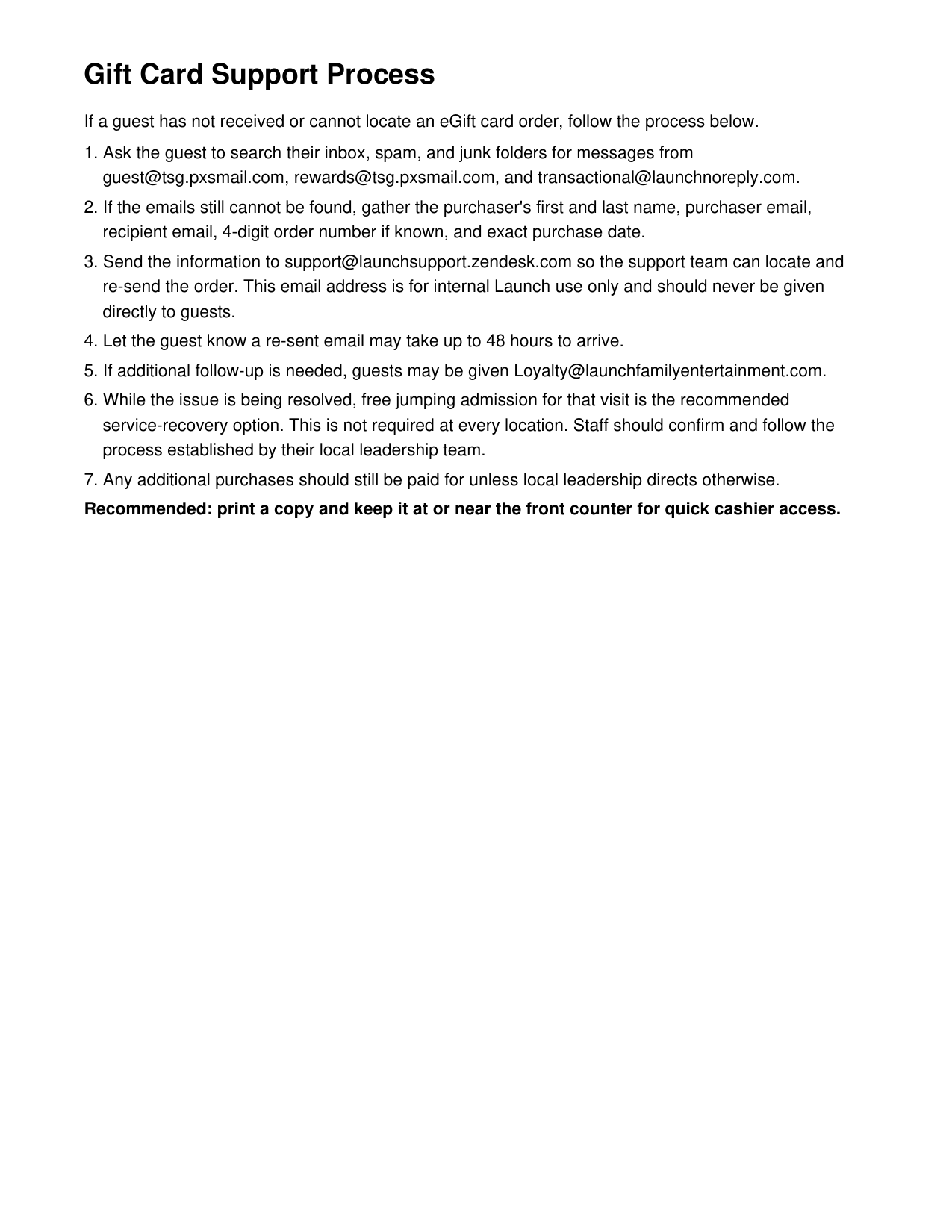
Print It.
Keep It Close.
A printable copy of the Gift Card Support Process is available from the main Gift Card Training screen.
Final Gift Card Recap
Before moving on to the exam, review the most important points from the Holiday Gift Card Sales Training.
Remember the Three Offers.
There are only three promotional combinations to remember. Each one includes a purchased gift card amount and a separate Bonus Value amount.
Gift Card Now
The purchased gift card amount is available immediately and can be used right away.
Bonus Value Later
Bonus Value is separate and can be redeemed beginning January 1, 2027.
Lucky Launcher Has Limits.
$50 or more in total gift-card purchases during one in-store transaction earns one Lucky Launcher Prize Ticket, while supplies last.
Use the Promotional POS Flow.
For in-store promotional sales, select the promotional button, choose either Bonus Value modifier option, and complete the load process correctly.
Select the Promotional Button
Use the Holiday promotional gift card button rather than the standard gift card buttons.
Choose Either Bonus Value Option
Either modifier option works the same, so the cashier may select either one.
Load the Gift Card Correctly
Finish the transaction and make sure the loaded gift card is handed to the guest.
Online Orders Arrive Separately.
Guests may receive multiple emails, and the gift card email and Bonus Value email are not the same thing. If everything arrived correctly, the guest already has what they need.
Use the Support Process.
Collect the correct order details, use the approved support channels, and set the correct guest expectation.
Collect the Details
Get the information Support needs to locate the order accurately.
Allow Up to 48 Hours
Let the guest know a re-sent gift card email may take up to 48 hours to arrive.
Follow Local Leadership
Use your park’s direction for service recovery while the issue is being resolved.
Execute It Correctly
and Explain It Clearly.
The goal is accurate execution and a clear guest explanation — not memorizing every sentence word for word.
Ready for the Gift Card Sales Exam?
When you are ready, move on to the exam and complete the final knowledge check.
Start Exam