
Launch Family Entertainment

Dearborn Membership Training

All 13 slides include completed narration. Visuals are synchronized to the spoken content for desktop review.

Membership Home
Launch Family Entertainment
Dearborn Membership TrainingSupplemental Membership Training
Launch cashiers at the front desk
Training Paused
Dearborn · Cashier Training

Membership Training

Know the offer. Explain the value. Make the ask.

Your Role

Introduce the option.

You may be the first person to tell a guest the membership exists.

No pressure.Make the choice clear.

The goal is to help guests understand another option is available and why it may make sense for them.

AccurateHelpfulGuest decides
What You’ll Learn

Explain it. Sell it.

1
Know the Dearborn membershipWhat it includes
2
Show the valueCompare it with starting admission
3
Answer guest questionsCommon FAQs and objections
4
Make the recommendationWork it naturally into admission
Dearborn Exclusive Membership offer
By the end of this training

Know it.
Explain it.
Offer it.

Accurately explain the membership, show the value, and make a clear recommendation.

Every admission guest
Launch cashier environment
Training Paused
Dearborn Membership

Know What
You’re Selling

Confidence starts with knowing exactly what the Dearborn membership includes — and what unlimited time and XP Arena mean compared with regular admission.

Dearborn Exclusive Membership offer
Dearborn Monthly Membership
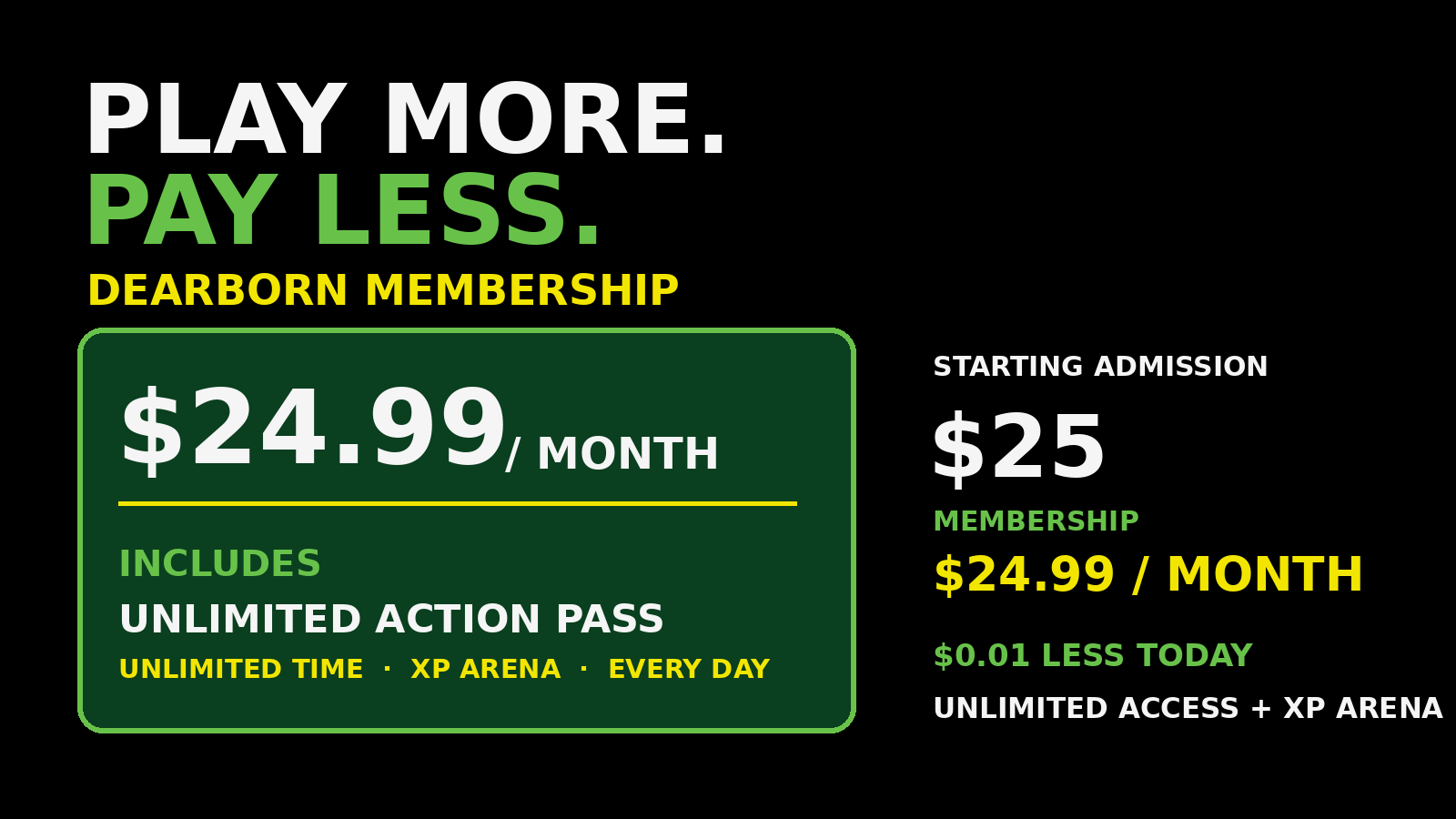
$24.99
per month
Unlimited Action Pass Access — Every Day
Dearborn benefits to remember

The Dearborn
Membership Includes

Unlimited Action Pass

Unlimited Action Pass access every day.

Unlimited Time

The Loaded admission does not include unlimited time.

$
XP Arena Included

XP Arena is included with the membership.

The Dearborn comparison

One Simple
Value Story

The membership gives the guest unlimited Action Pass access every day, plus XP Arena, instead of the time-limited access of a Loaded admission.

Option
Price
Access
Loaded Admission
Starts at $25
Time-Limited · No XP Arena
Membership
$24.99 / month
Unlimited · XP Arena
Membership Advantage
$0.01 Less
Unlimited Time + XP Arena
Dearborn’s key distinction: Loaded admission does not include unlimited time or XP Arena.
The full Dearborn value

Explain The
Complete Membership

$24.99Per Month
UnlimitedAction Pass
UnlimitedTime
XP Arena IncludedDearborn Advantage
Starting admission is $25 — the membership payment is already $0.01 less
Accuracy matters

Explain What’s
Actually Included

Never add a benefit or make an exception that is not part of the approved Dearborn membership.

If you’re unsure, confirm before answering
Launch cashier environment
Training Paused
Dearborn Membership Value

Why The Membership
Makes Sense

The Dearborn value is simple: the monthly membership payment is already lower than the starting admission price, with unlimited access included.

Starting Admission
$25
Starting admission price
VS
Monthly Membership
$24.99
Unlimited Action Pass access + XP Arena
Value starts immediately

$25 Admission
$24.99 Membership

The first monthly membership payment is already $0.01 less than the starting admission price.

Unlimited Action Pass · Unlimited Time · XP Arena
More access for a lower first payment

Unlimited Action Pass.
Every Day.

Instead of purchasing only today’s admission, the guest receives unlimited Action Pass access every day, plus XP Arena.

Keep the comparison simple

$25 Admission.
$24.99 Membership.

Compare the price$25 vs. $24.99
Explain unlimited accessUnlimited Action Pass
Emphasize extra valueUnlimited time + XP Arena
Launch cashier environment
Training Paused
Dearborn Membership Sales

How To
Sell It

Selling the membership should feel like a normal part of the admission conversation — not a complicated sales pitch.

1Present
2Compare
3Recommend
4Confirm
1
Present
Make sure they know it exists
2
Compare
Show today vs. monthly
3
Recommend
Explain why it may fit
4
Confirm
Ask for the decision
Step 1 · Present

Make Sure
They Know

Simply tell the admission guest that the Dearborn membership is available. You cannot sell an option the guest never hears about.

“Before we finish, I want to let you know about our membership option.”
Step 2 · Compare

Show The
Local Comparison

Dearborn’s starting admission is $25. The membership is $24.99 per month.

$25 Admission$24.99 / Month
$0.01 less for the first monthly payment
Step 3 · Recommend

Explain The
Membership Advantage

For $24.99 per month, the guest receives unlimited Action Pass access every day, plus XP Arena.

Unlimited Action Pass — every day.
Step 4 · Confirm

Make The
Clear Ask

Ask directly whether the guest would like to make today’s visit a membership — then give them room to answer.

“Would you like to make today’s visit a membership?”
The sales standard

Keep It Simple.
Keep It Conversational.

Make the Dearborn value easy to understand, then give the guest a clear opportunity to say yes or no.

PresentCompareRecommendConfirm
Launch cashier environment
Training Paused
Dearborn Membership Sales

Put It Into A
Real Conversation

You do not need to memorize a script word for word. Cover the important pieces, keep it natural, and make the offer clearly.

1Present2Compare3Recommend4Confirm
A simple Dearborn conversation

Sound
Natural

Use your own voice. Make sure the guest hears the $25 versus $24.99 comparison, unlimited Action Pass access, XP Arena, and a clear question.

Cashier
“Before you purchase today’s admission, I want to let you know that our membership is $24.99 per month.
“Today’s starting admission is $25, so the membership payment is actually $0.01 less…”
“…and it gives you unlimited Action Pass access every day, plus XP Arena.”
“Would you like me to make today’s visit a membership?”
That is the entire conversation

Four Steps.
One Natural Ask.

Present the membership, compare the price, explain the additional access, and ask for the sale.

PresentCompareRecommendConfirm
After the question

Ask.
Then Pause.

Stop talking and give the guest a chance to answer.

Give the guest room to decide
Launch cashier environment
Training Paused
Dearborn Membership Operations

They Said Yes.
Now Complete The Sale.

Once the guest chooses the membership, use the POS process carefully so the correct guest is attached to the membership.

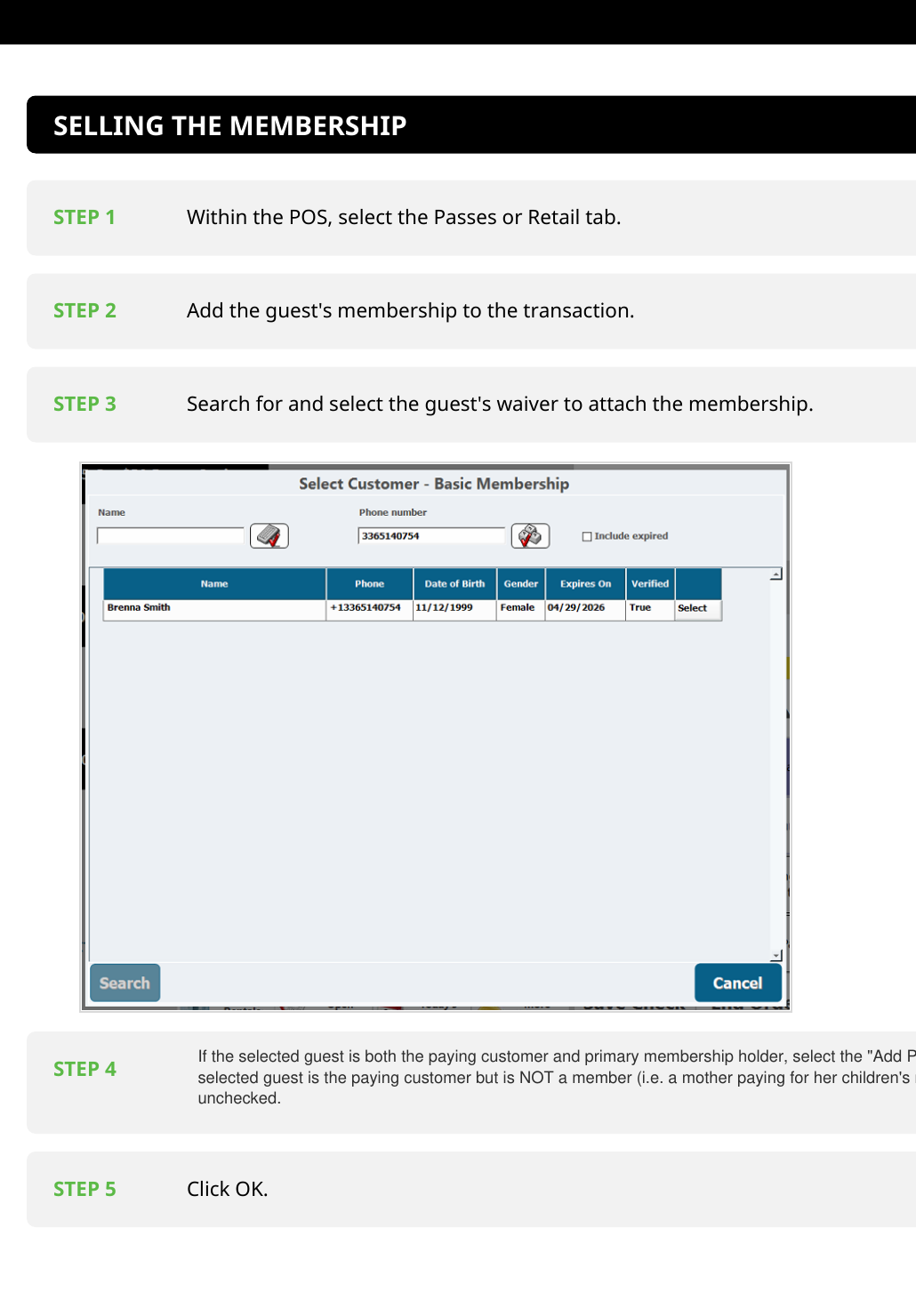
1Passes / Retail2Add Membership3Select Waiver4Primary Member5Click OK
Start the membership sale

Begin In
The POS

Use the membership area of the POS, then add the guest's membership to the transaction.
1
Select Passes or RetailOpen the membership selling area.
2
Add the membershipAdd the Dearborn membership to the transaction.
Launch SOP showing steps for selling a membership
Real SOP Reference
Attach the correct guest

Find Their
Waiver

Search for the guest's waiver and select the correct guest so the membership is attached to that person.
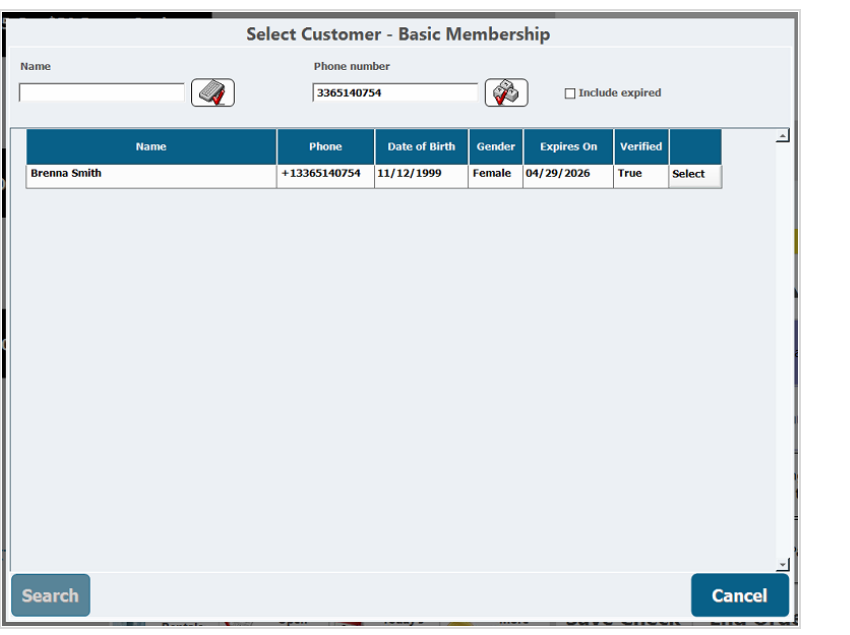
Verify the guest before moving forward.
CenterEdge Select Customer membership screen
Paying customer vs. member

Who Is The
Primary Member?

Use the “Add Primary to Membership” box based on who is actually becoming a member.
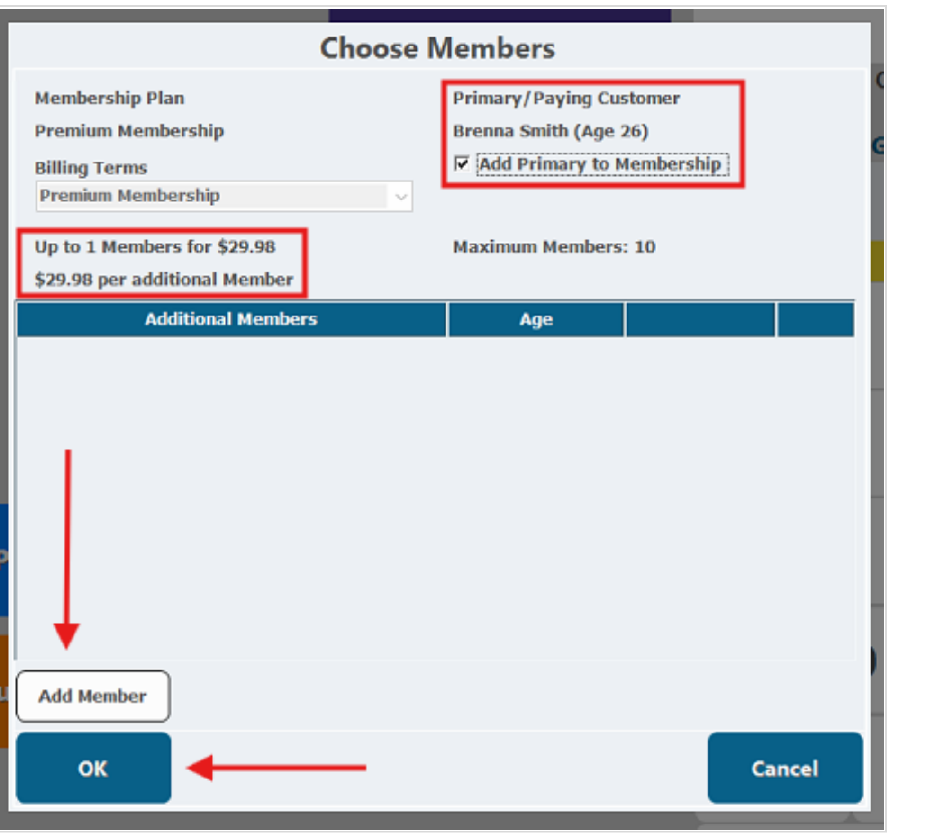
Paying customer IS the primary member
✓ Select the checkbox
Paying customer is NOT a member
Leave the checkbox unchecked
CenterEdge Choose Members screen showing Add Primary to Membership
Once the member information is correct

Step 5
Click OK.

Continue only after you have confirmed the correct guest and primary-member selection.
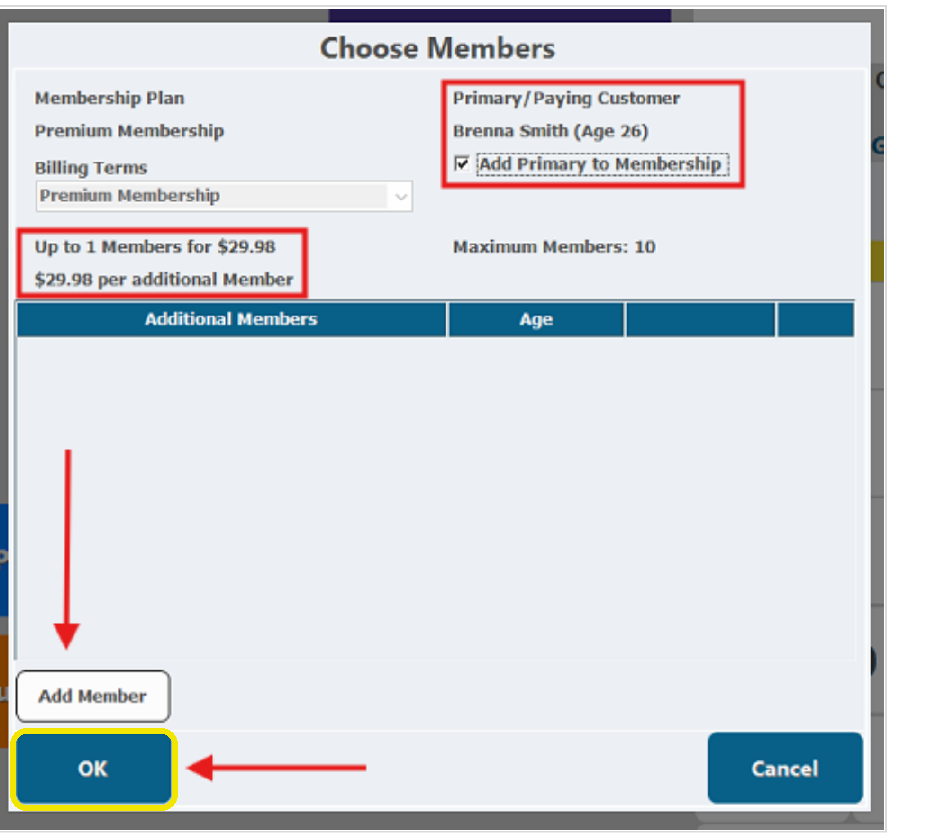
CenterEdge Choose Members screen with the OK button highlighted
Launch cashier environment
Training Paused
Dearborn Membership Operations

Finish The
Membership Sale

After the member information is correct, complete the agreement and payment steps carefully so the membership can renew as intended.

6 · Agreement7 · End Order8 · Tender
Guest action required

Turn The POS
Toward The Guest

The guest should review the Membership Agreement, check the required acknowledgement boxes themselves, and then select Submit.
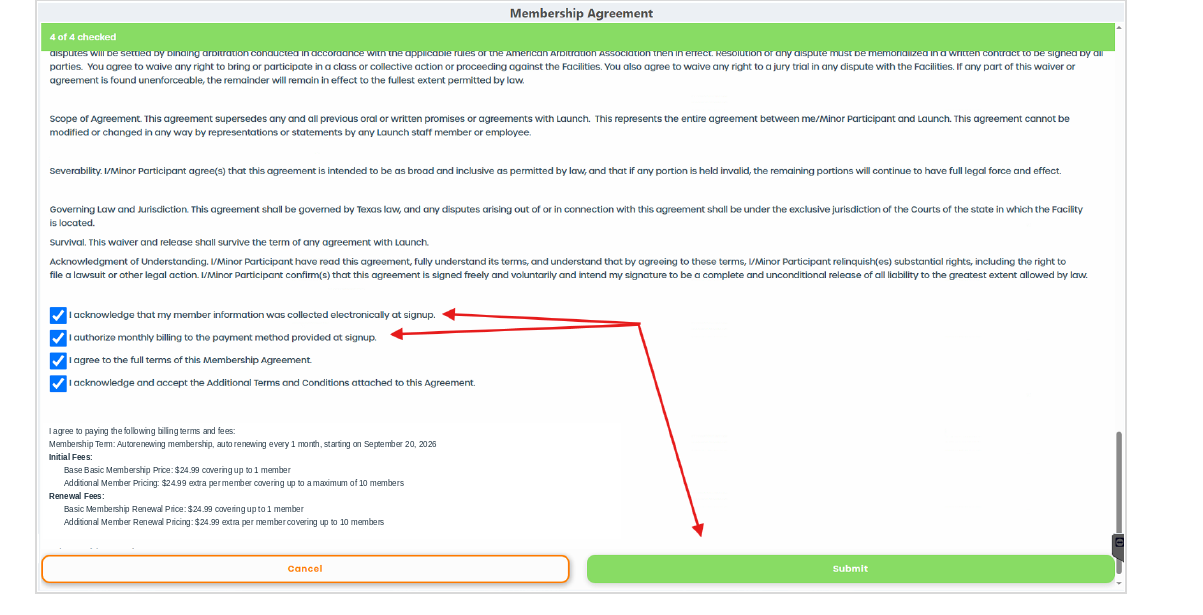
Guest reviews · Guest checks boxes · Guest submits
CenterEdge Membership Agreement screenGuest completes this step
Complete the transaction

Move To
Payment

Once the agreement is accepted, continue to the payment screen and tender the transaction normally.

6
AgreementAccepted + submitted
7
End OrderContinue to payment
8
TenderProcess the transaction
Important payment rule

Not Paying By
Credit Card?

The POS will prompt you to store a tokenized credit card. Complete that prompt so the membership has a card available for automatic renewal.

Stored securely as a tokenized card
Card Required For RenewalEven when today's transaction is paid another way.
Before you finish

Complete Every
Required Step.

Make sure the agreement is accepted, the transaction is tendered, and any required renewal-card prompt has been completed correctly.

Accuracy protects the guest and the membership
Launch cashier environment
Training Paused
Dearborn Membership Exception

Guest Already
Bought Online?

A guest may arrive with an online admission ticket and decide they would rather become a member.

Launch Dearborn
Online Ticket
Admission Purchased Before Arrival
Wants A
Membership
Important local procedure

The Standard Process
May Not Apply.

This situation is handled according to Dearborn's locally approved procedure.

Online Ticket → Membership
Follow Dearborn's Local ProcessDo not assume the normal in-store membership-sale steps are the correct way to handle an already-purchased online admission.
Protect the guest and the transaction

Do Not Make Up The Process.

×
Don't Guess

If you are unsure how the online ticket should be handled, do not improvise.

×
Don't Create A Workaround

Use the park's approved procedure rather than inventing your own steps.

×
Don't Promise A Credit

Never promise that the online ticket will automatically be applied toward the membership.

When this situation happens

Get With
Your Manager.

Follow Dearborn's approved process for converting an online ticket to a membership.

Ask before taking action
Launch cashier environment
Training Paused
Dearborn Membership Check-In

Checking In An
Existing Member

Use the Membership Check In process, verify the correct guest and membership, and remember that Launch socks are still required for members.

Redeeming The Membership
Start the check-in

Admissions →
Membership Check In

Open the Admissions tab, then ring in the Membership Check In ticket.
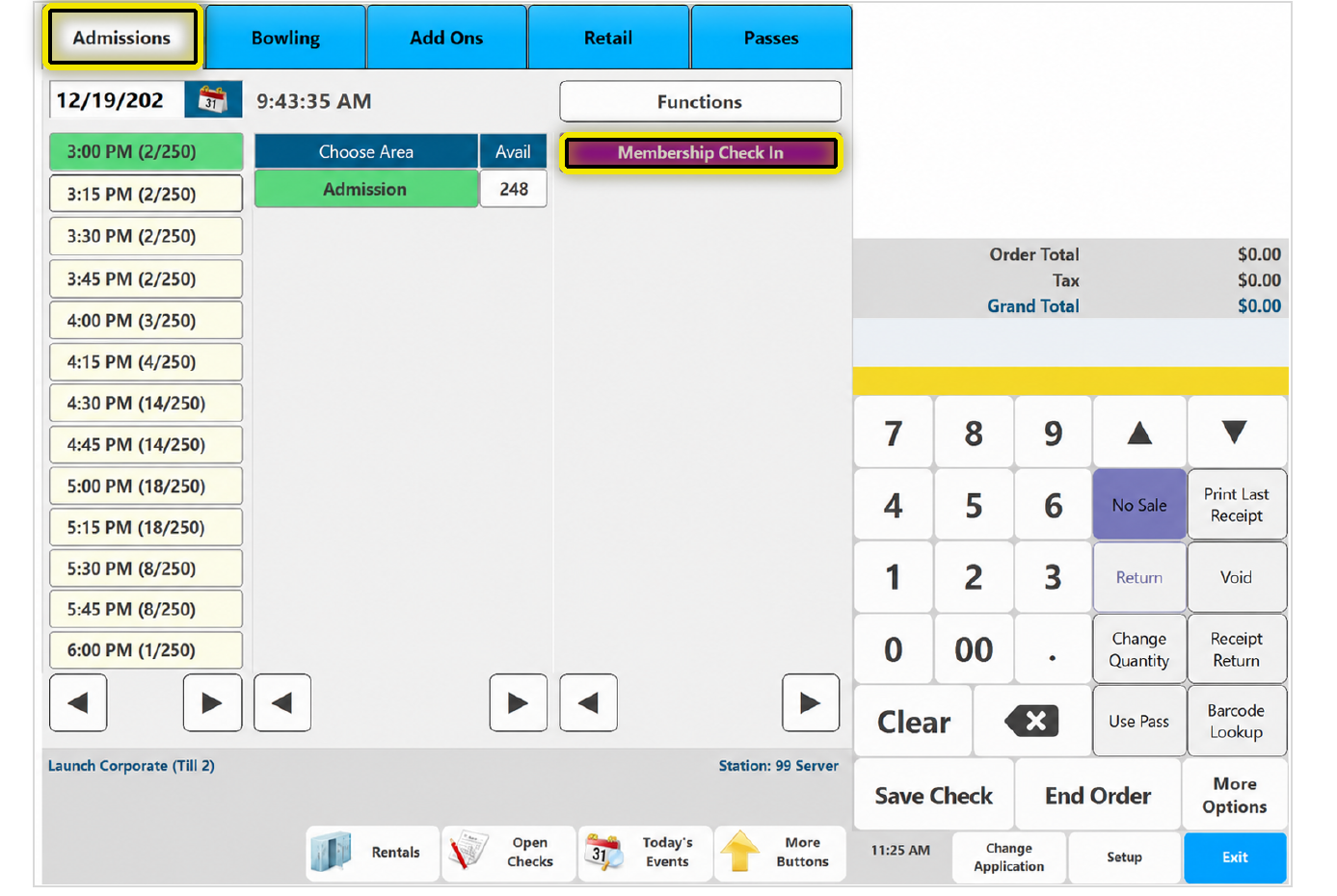
CenterEdge Admissions screen with Admissions and Membership Check In highlighted
Identify the member

Find The Actual
Member

Search for and select the waiver for the actual member who is checking in.
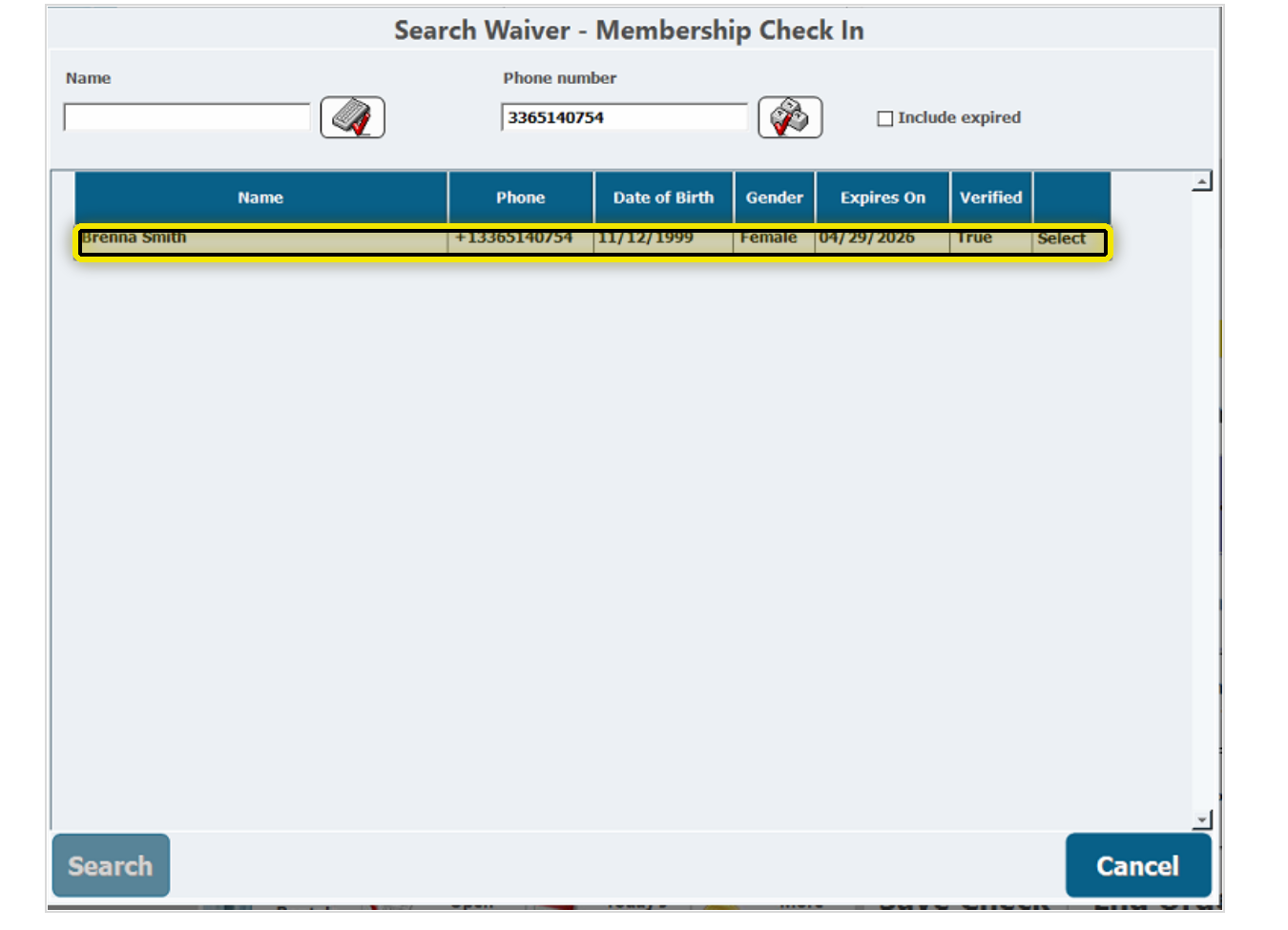
Select the waiver belonging to the guest who is actually checking in — accuracy matters.
CenterEdge Search Waiver screen with the selected member row highlighted
Confirm before redeeming

Correct Member.
Correct Membership.

The available membership pass will display. Confirm that the member and membership are correct before moving forward.
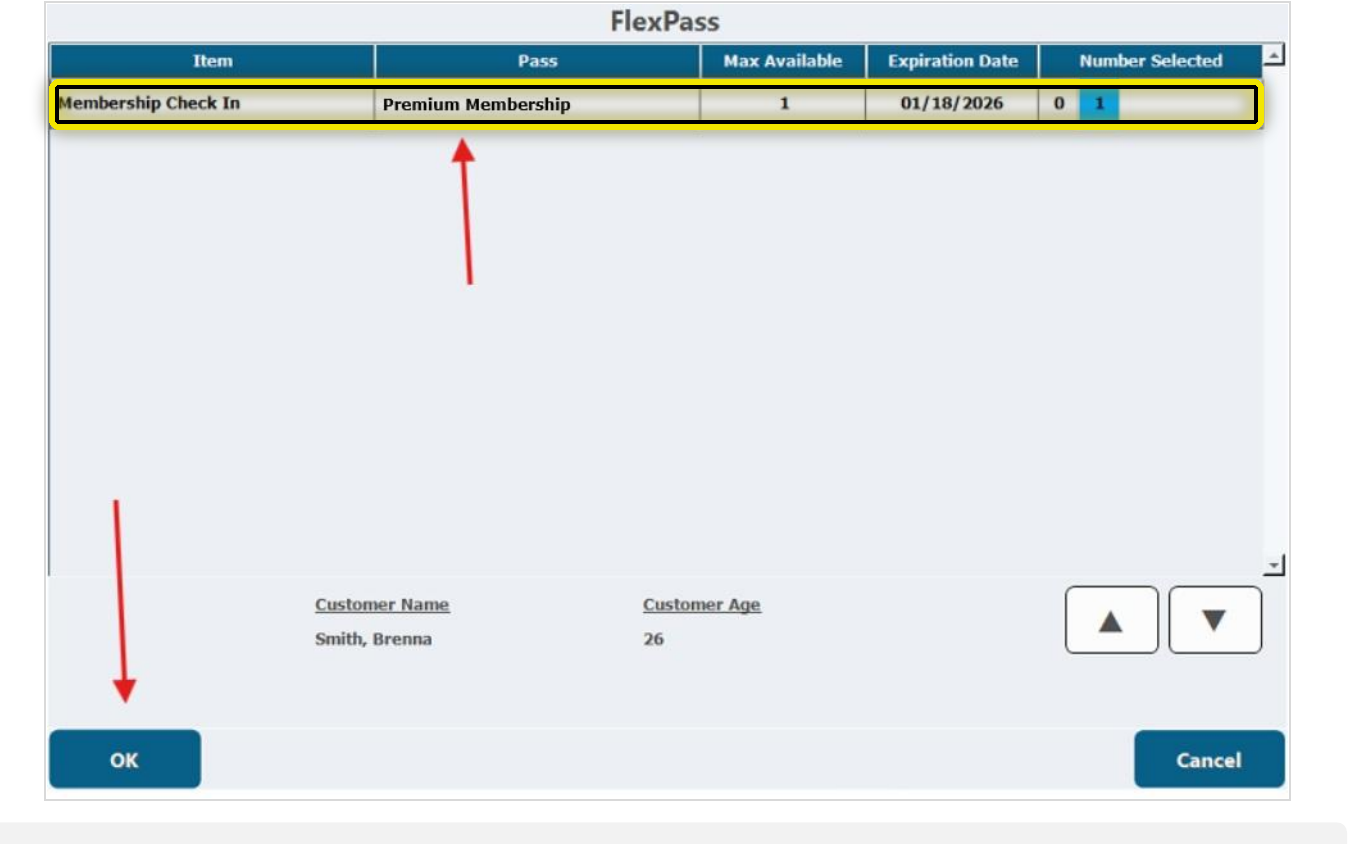
CenterEdge FlexPass screen with the membership pass row highlighted
Required for members too

Check For
Launch Socks

Membership does not remove the Launch socks requirement. Make the sock check part of every member check-in.

Ask To See ThemAsk the guest to show their Launch socks during check-in.
Members Still Need ThemLaunch socks are required even when the guest has an active membership.
$
No Socks?The guest must purchase a pair before participating.
Everything verified

Now Redeem
The Pass

Once the guest, membership, and Launch socks are confirmed, click OK to redeem the membership pass.
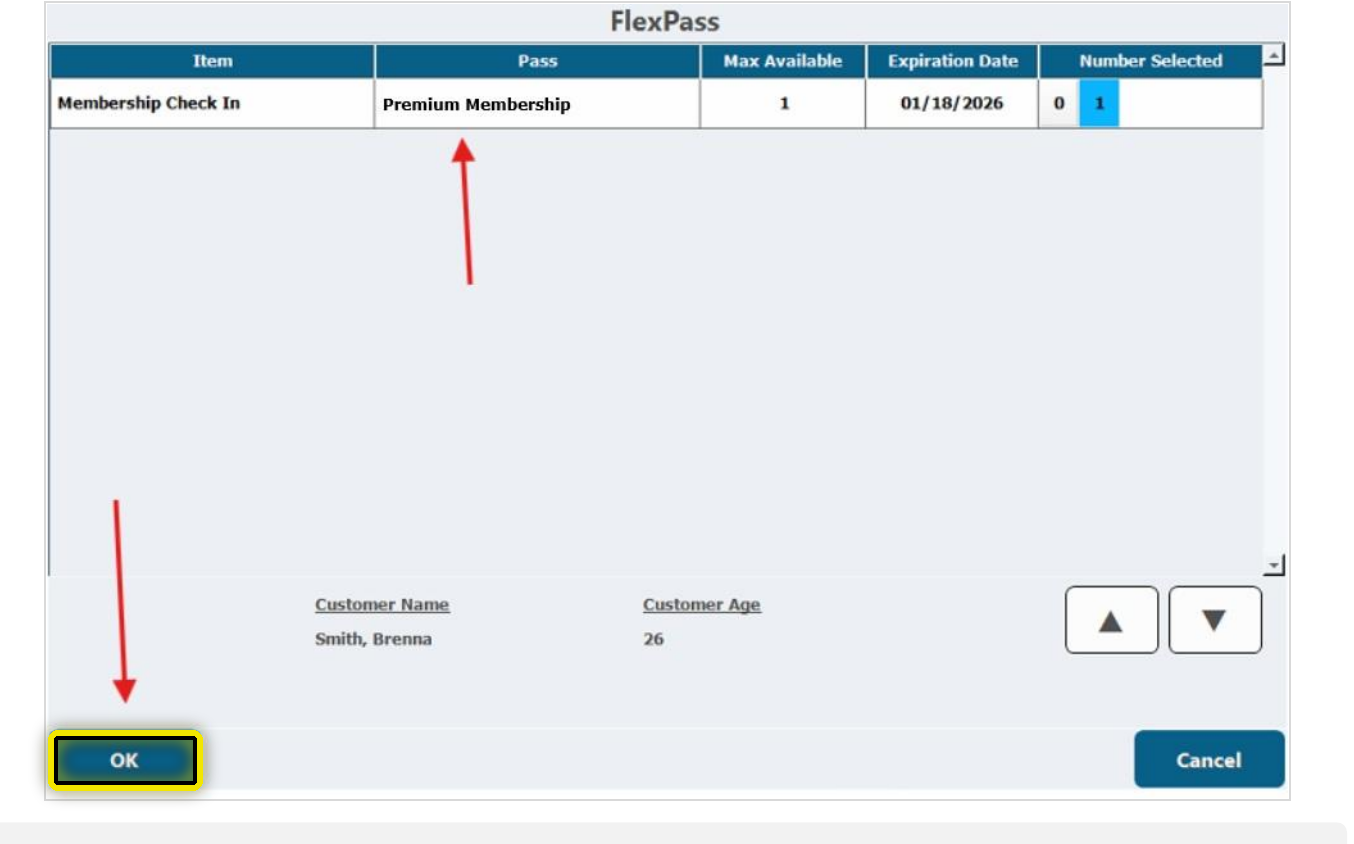
Before moving forward: correct member, correct membership, and Launch socks. Accuracy matters.
CenterEdge FlexPass screen with the OK button highlighted
Before moving forward

Verify Everything.
Accuracy Matters.

Correct Member

Confirm you selected the guest who is actually using the membership.

Correct Membership

Confirm the membership belongs to the guest.

Launch Socks

Ask to see them. Members still need Launch socks.

Selecting the wrong waiver or membership can create problems with the check-in. Verify first, then continue.
Launch cashier environment
Training Paused
Dearborn Membership Check-In

Finish The
Member Check-In

After the membership pass is redeemed, verify the check-in ticket is zeroed out before completing the order.

Step 7 → Verify $0.00 · Step 8 → Complete The Order
Confirm before finishing

Look For
$0.00

The Membership Check In ticket should show a zero-dollar total. This confirms the membership was applied correctly.
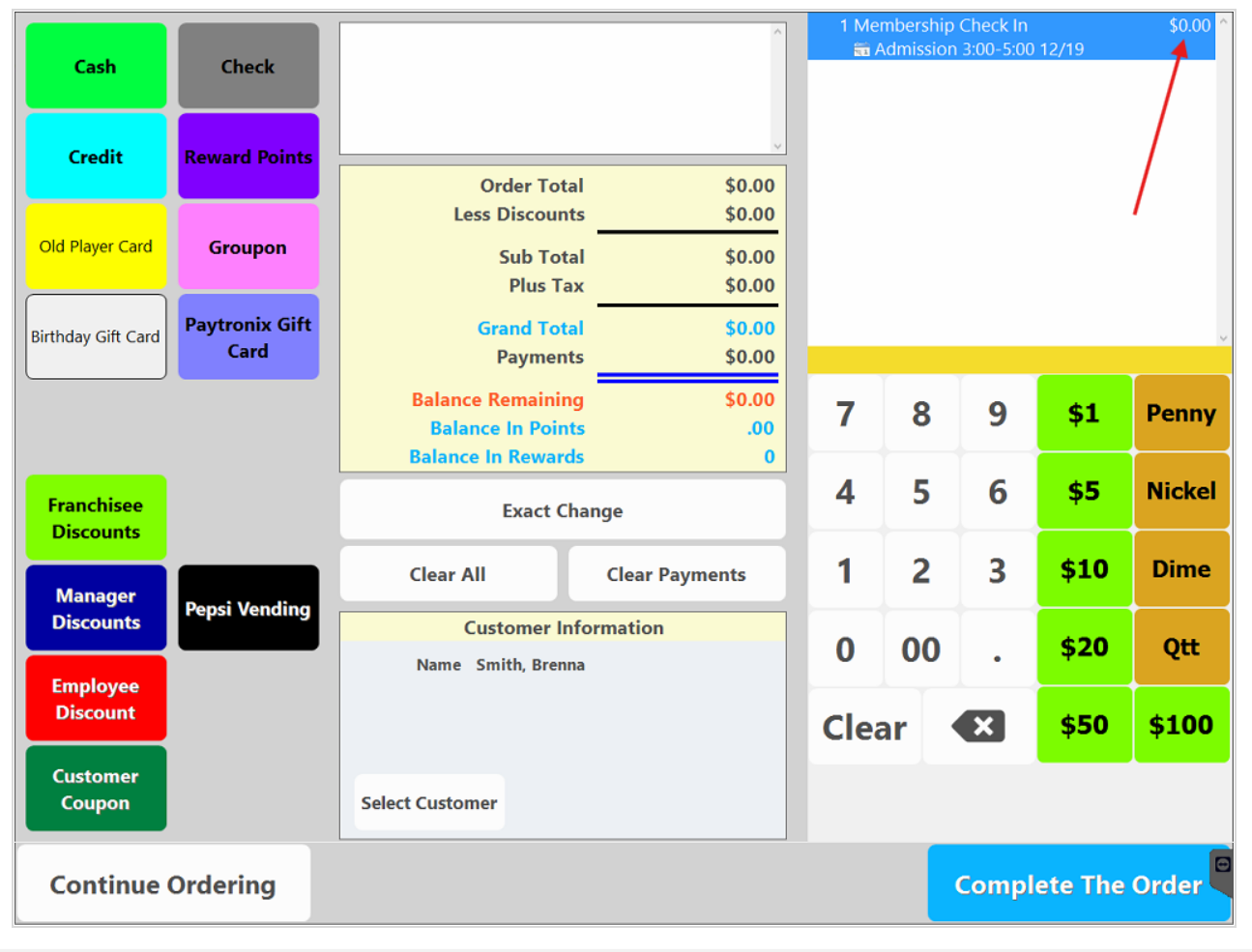
Then select Complete The Order to finish the transaction.
CenterEdge payment screen showing zero-dollar Membership Check In and Complete The Order
Before completing the transaction

Verify The
Membership Applied.

Do not rush past the zero-dollar check. If the Membership Check In ticket does not zero out as expected, stop and get a manager before continuing.

Unexpected charge? Get a manager.
Dearborn Membership FAQ

Questions
You’ll Hear

Guests will often have questions before deciding whether the membership is right for them. Keep the answers simple, accurate, and confident.

Know the answer · Explain it simply · Never guess
Common Question

“What does the membership include?

Dearborn Answer
Unlimited Action Pass — Every Day + XP Arena

The Dearborn membership includes unlimited Action Pass access every day, plus XP Arena.

Unlimited Action Pass · Unlimited Time · XP Arena
Common Question

“Why membership instead of admission today?

Use The Local Comparison
$25 Admission vs. $24.99 Membership

The first monthly payment is already $0.01 less than starting admission while giving the guest unlimited Action Pass access every day, plus XP Arena.

$0.01 less today · unlimited access + XP Arena
Common Question

“Can family members share one?

Dearborn Answer
No — Memberships Are Individual

Memberships are assigned to individual guests. Each person who wants membership access needs their own membership.

Assigned by guest
Common Question

“Is there a commitment?

Dearborn Answer
One-Year Commitment

The Dearborn membership has a one-year commitment and is billed monthly.

One year · billed monthly
Your job

Simple. Accurate.
Confident.

Do not overcomplicate the answers. Keep the membership explanation simple, accurate, and confident.

Launch cashier environment
Training Paused
Dearborn Membership Sales

When The Guest
Hesitates

Not every guest will say yes right away. Handle concerns naturally without turning the conversation into a hard sell.

Acknowledge → Clarify → Close
1
AcknowledgeShow that you heard the concern.
2
ClarifyFind out what the guest is actually worried about.
3
CloseAnswer accurately, then give the guest a clear choice.
Step 1 · Acknowledge

Show Them
You’re Listening

Acknowledge the concern so the guest knows you heard what they said.

Step 2 · Clarify

What Do They
Actually Mean?

If a guest says, “I’m not sure it’s worth it,” determine whether the concern is price, commitment, or whether they will use it enough.

Step 3 · Close

Respond To The
Specific Concern

Answer that concern clearly, then give the guest a clear opportunity to decide.

Dearborn Example
“I’m not sure it’s worth it.”
Cashier
“I understand. Today’s starting admission is $25, while the membership is $24.99 per month. So the monthly membership payment is already $0.01 less, and it gives you unlimited Action Pass access every day, plus XP Arena.
Then Ask
“Would you like to make today’s visit a membership?”
Ask clearly, then give the guest the opportunity to decide.
The goal is not to argue

Understand. Respond.
Let Them Decide.

Understand the concern, respond clearly, and then let the guest decide.

Acknowledge · Clarify · Close
Launch cashier environment
Training Paused
Dearborn Membership Training

Final Review
Before The Exam

Review the key points you need to explain, sell, and redeem the Dearborn membership correctly.

Know It · Explain It · Execute It
Five things to remember

Finish
Strong

Use these core behaviors every time you work with a Dearborn membership guest.

1
Know What You’re Selling$24.99/month · unlimited Action Pass every day · XP Arena included.
2
Explain The Value$25 starting admission versus $24.99 membership with unlimited access + XP Arena.
3
Use The POS CorrectlySet up the membership carefully and have the guest accept the Membership Agreement.
4
Check Members In CorrectlySelect the actual member, verify Launch socks, and confirm the check-in reaches $0.00.
If you are not sure

Do Not Guess.
Get A Manager.

For online-ticket conversions or any unusual membership situation, follow Dearborn’s approved process and make sure the guest receives accurate information.

Accuracy First
You are now ready

Dearborn
Membership Exam

You are now ready to complete the Dearborn Membership Exam.

Return Home & Select Membership Exam