

Membership Training
Know the offer. Explain the value. Make the ask.
Introduce the option.
You may be the first person to tell a guest the membership exists.
No pressure.Make the choice clear.
The goal is to help guests understand another option is available and why it may make sense for them.
Explain it. Sell it.

Know it.
Explain it.
Offer it.
Accurately explain the membership, show the value, and make a clear recommendation.
Know What
You’re Selling
Confidence starts with knowing the offer accurately before you ever recommend it to a guest.
All attractions
located upstairs
For Warwick cashiers, this is the simple shorthand for what the membership includes.
What’s Included
All of the upstairs attractions — including:
Explain What’s
Actually Included
Never add a benefit or make an exception that is not part of the approved Warwick membership.
Why The Membership
Makes Sense
Once you know the offer, the next step is understanding the simple value comparison you can show a guest.
Save $10 Today
By Choosing Membership
Regular admission is $29.99. The membership is $19.99 per month — the savings start on this visit.
Savings Start
Right Now.
The guest does not need another visit to see immediate value. They are already paying $10 less today.
Show It. Explain It.
Let Them Decide.
How To
Sell It
Selling the membership should feel like a normal part of the admission conversation — not a complicated sales pitch.
Make Sure
They Know
Simply tell the admission guest that the Warwick membership is available. You cannot sell an option the guest never hears about.
Show The
Immediate Savings
Regular admission is $29.99. The membership is $19.99 per month, so the guest saves $10 on today’s visit.
Explain What
They Get
They pay less today and get unlimited access to all attractions located upstairs. Any future visits simply add even more value.
Make The
Clear Ask
Ask directly whether the guest would like to make today’s visit a membership — then give them room to answer.
Keep It Simple.
Keep It Conversational.
Make the $10 savings today easy to understand, then give the guest a clear opportunity to say yes or no.
Put It Into A
Real Conversation
You do not need to memorize a script word for word. Cover the important pieces, keep it natural, and make the offer clearly.
Sound
Natural
Use your own voice. Just make sure the guest hears the price, the benefit, the value, and a clear question.
Four Steps.
One Natural Ask.
Present the option, show the immediate savings, explain what is included, and ask for the sale.
Ask.
Then Pause.
Stop talking and give the guest a chance to answer.
They Said Yes.
Now Complete The Sale.
Once the guest chooses the membership, use the POS process carefully so the correct guest is attached to the membership.
Begin In
The POS
Use the membership area of the POS, then add the guest's membership to the transaction.
Find Their
Waiver
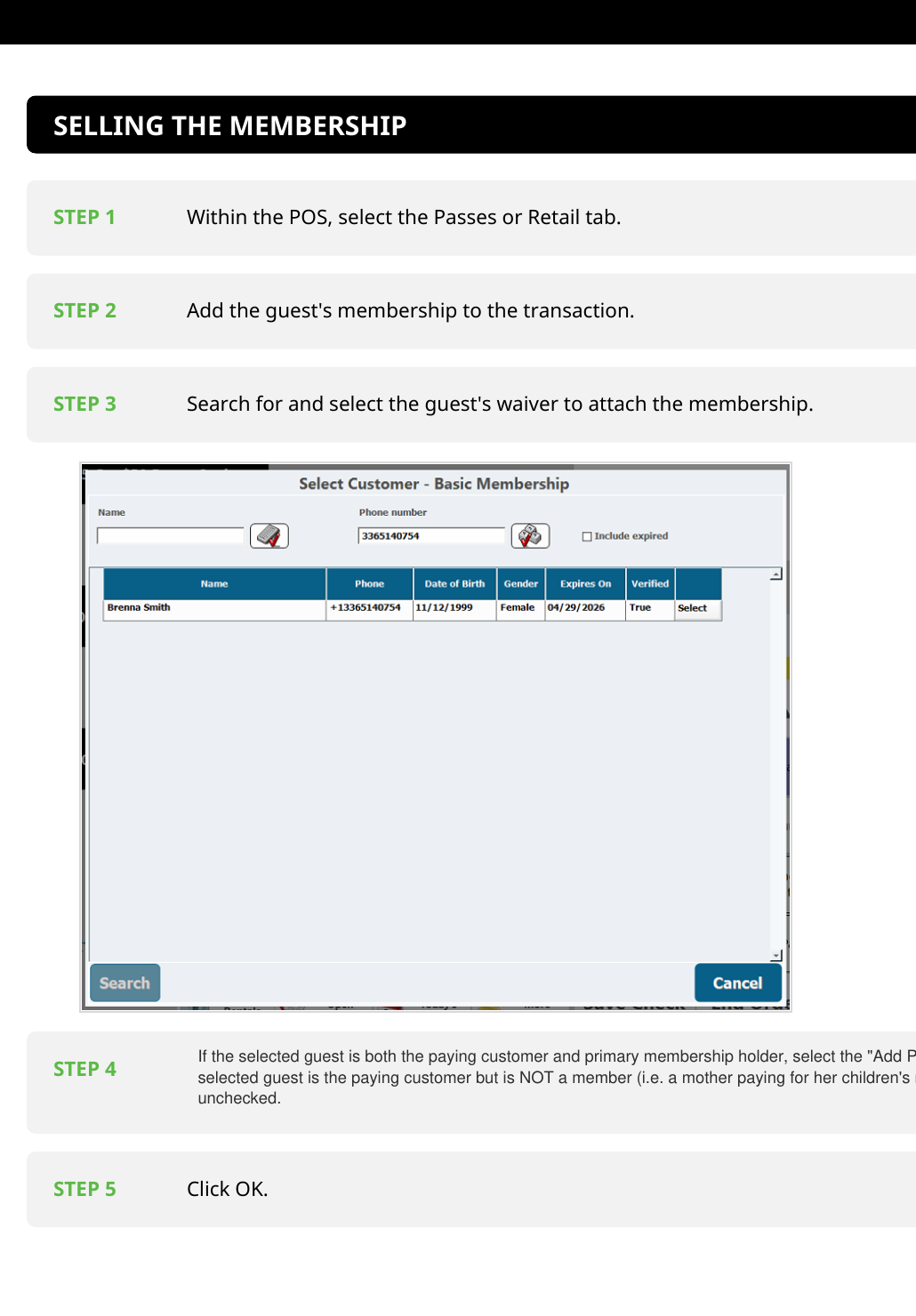
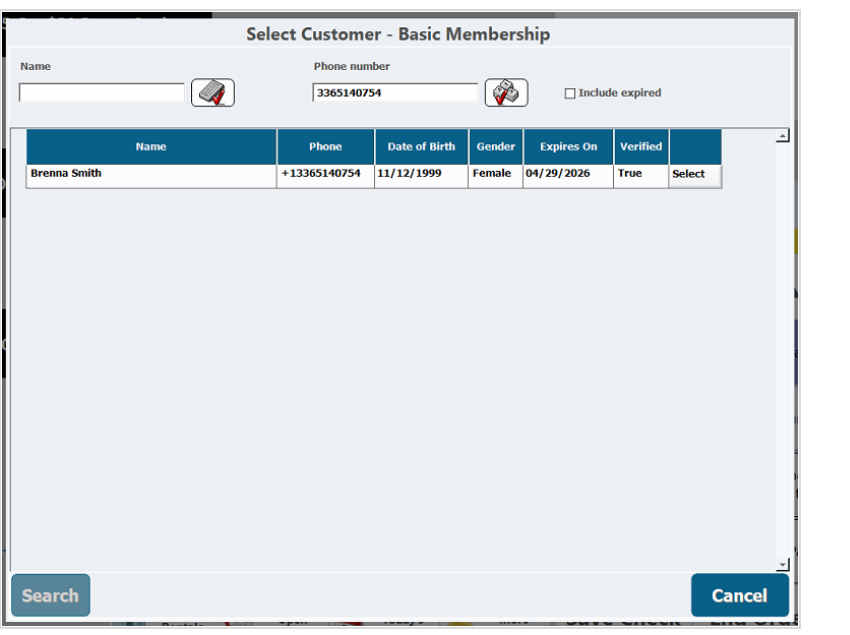
Search for the guest's waiver and select the correct guest so the membership is attached to that person.
Who Is The
Primary Member?
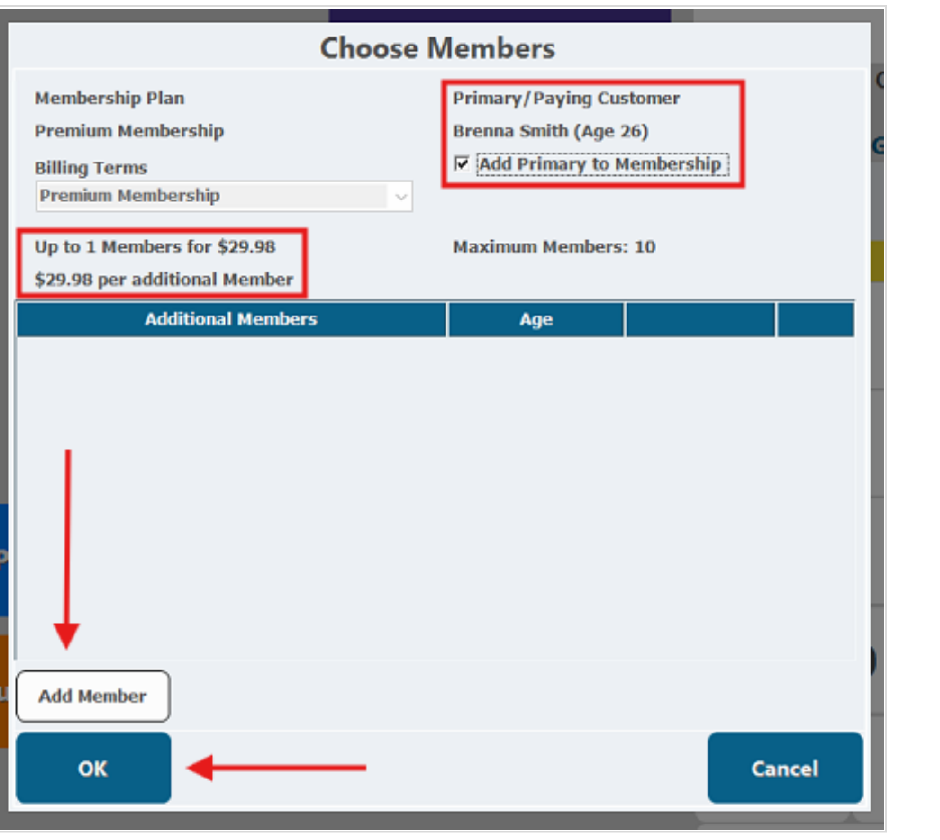
Use the “Add Primary to Membership” box based on who is actually becoming a member.
Step 5
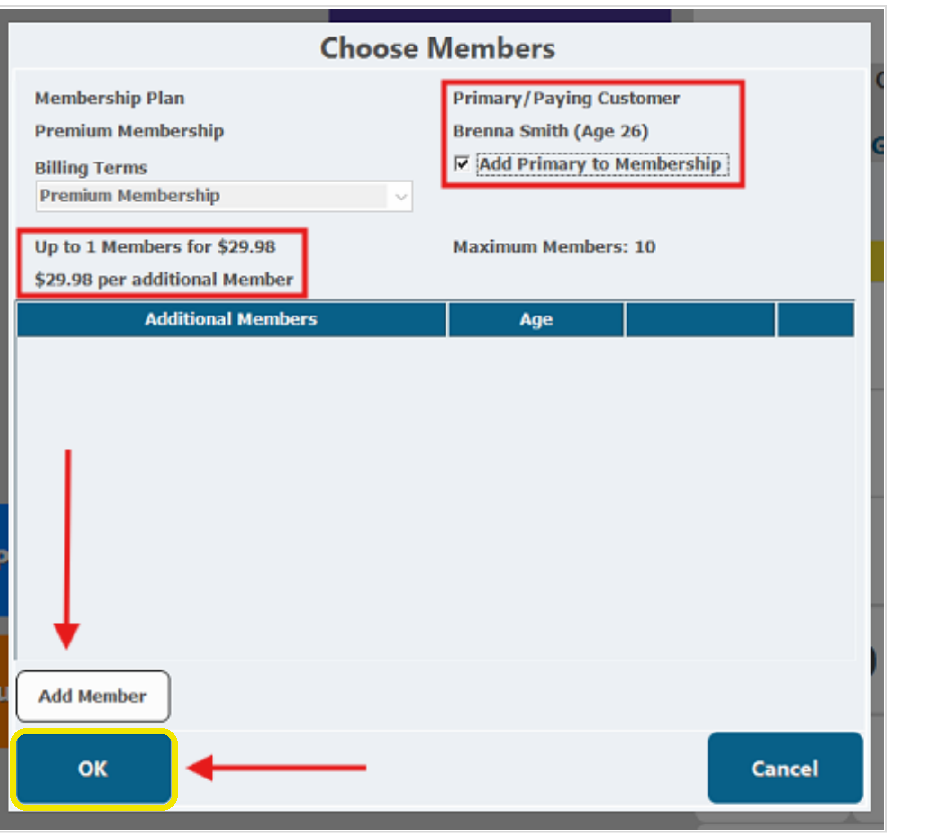
Click OK.
Continue only after you have confirmed the correct guest and primary-member selection.
Finish The
Membership Sale
After the member information is correct, complete the agreement and payment steps carefully so the membership can renew as intended.
Turn The POS
Toward The Guest
The guest should review the Membership Agreement, check the required acknowledgement boxes themselves, and then select Submit.
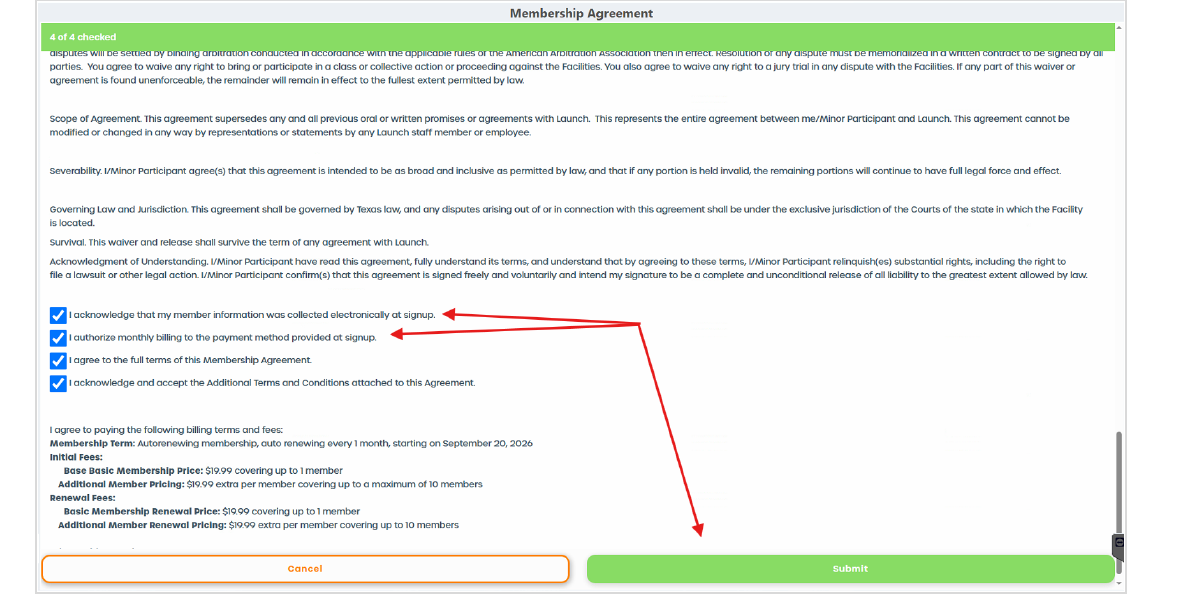 Guest completes this step
Move To
Payment
Once the agreement is accepted, continue to the payment screen and tender the transaction normally.
Not Paying By
Credit Card?
The POS will prompt you to store a tokenized credit card. Complete that prompt so the membership has a card available for automatic renewal.
Complete Every
Required Step.
Make sure the agreement is accepted, the transaction is tendered, and any required renewal-card prompt has been completed correctly.
Guest Already
Bought Online?
A guest may arrive with an online admission ticket and decide they would rather become a member.
Membership
The Standard Process
May Not Apply.
This situation is handled according to Warwick's locally approved procedure.
Do Not Make Up The Process.
If you are unsure how the online ticket should be handled, do not improvise.
Use the park's approved procedure rather than inventing your own steps.
Never promise that the online ticket will automatically be applied toward the membership.
Get With
Your Manager.
Follow Warwick's approved process for converting an online ticket to a membership.
Checking In An
Existing Member
Use the Membership Check In process, verify the correct member and membership, and remember that Launch socks are still required for members.
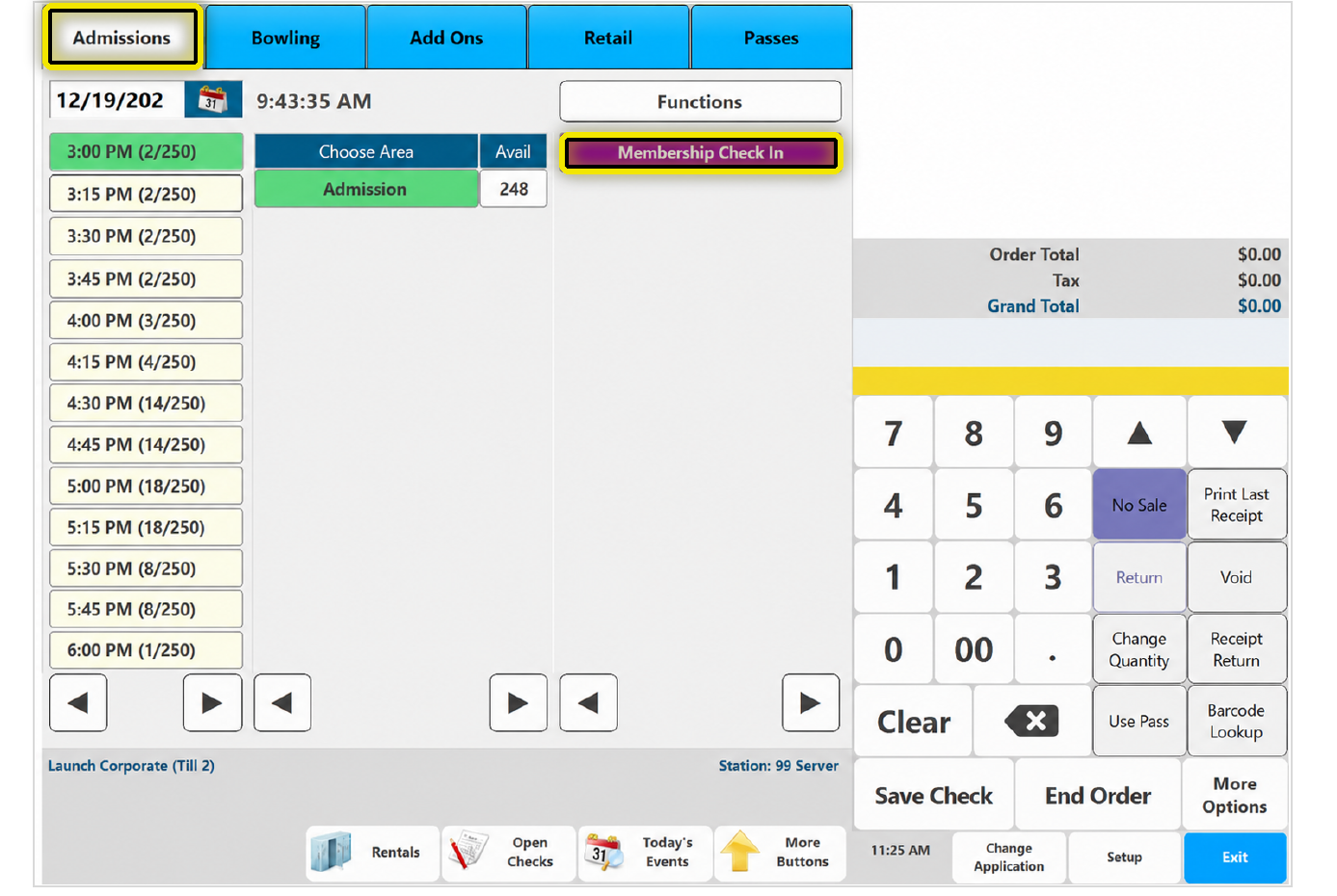
Admissions →
Membership Check In
Open the Admissions tab, then ring in the Membership Check In ticket.
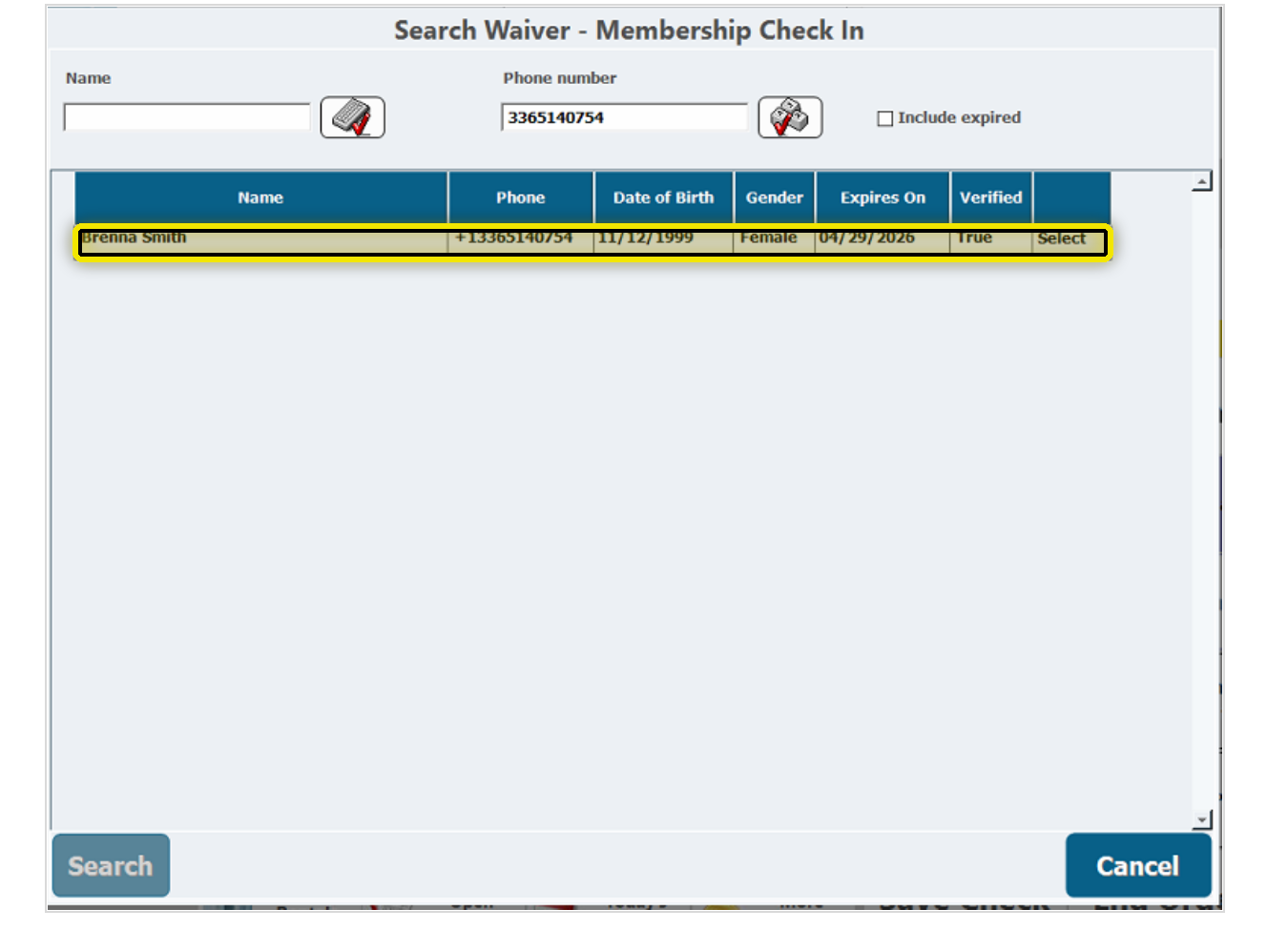
Find The Actual
Member
Search for and select the waiver for the actual member who is checking in.
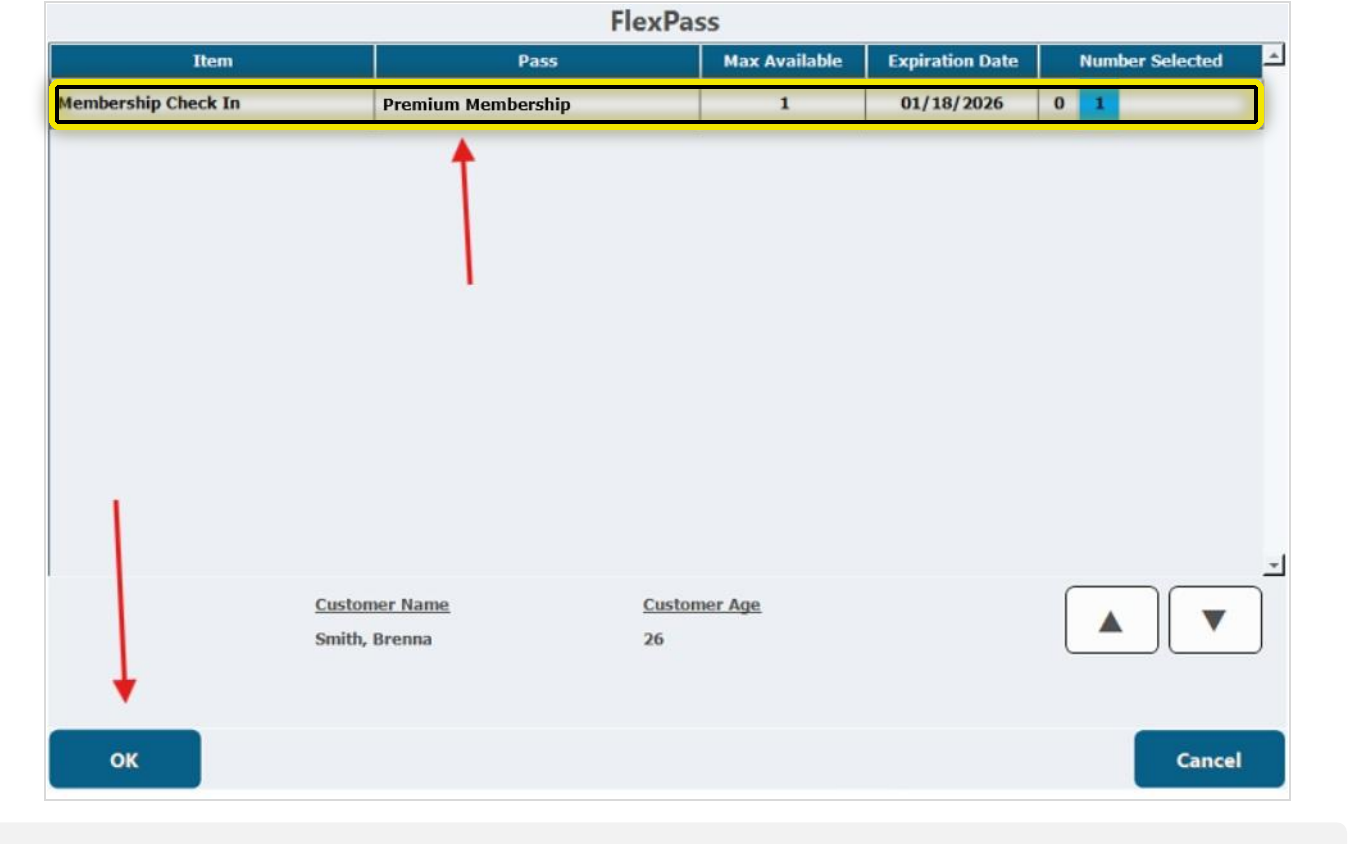
Correct Member.
Correct Membership.
The available membership pass will display. Confirm that the member and membership are correct before moving forward.
Check For
Launch Socks
Membership does not remove the Launch socks requirement. Make the sock check part of every member check-in.
Now Redeem
The Pass
Once the member, membership, and Launch socks are confirmed, click OK to redeem the membership pass.
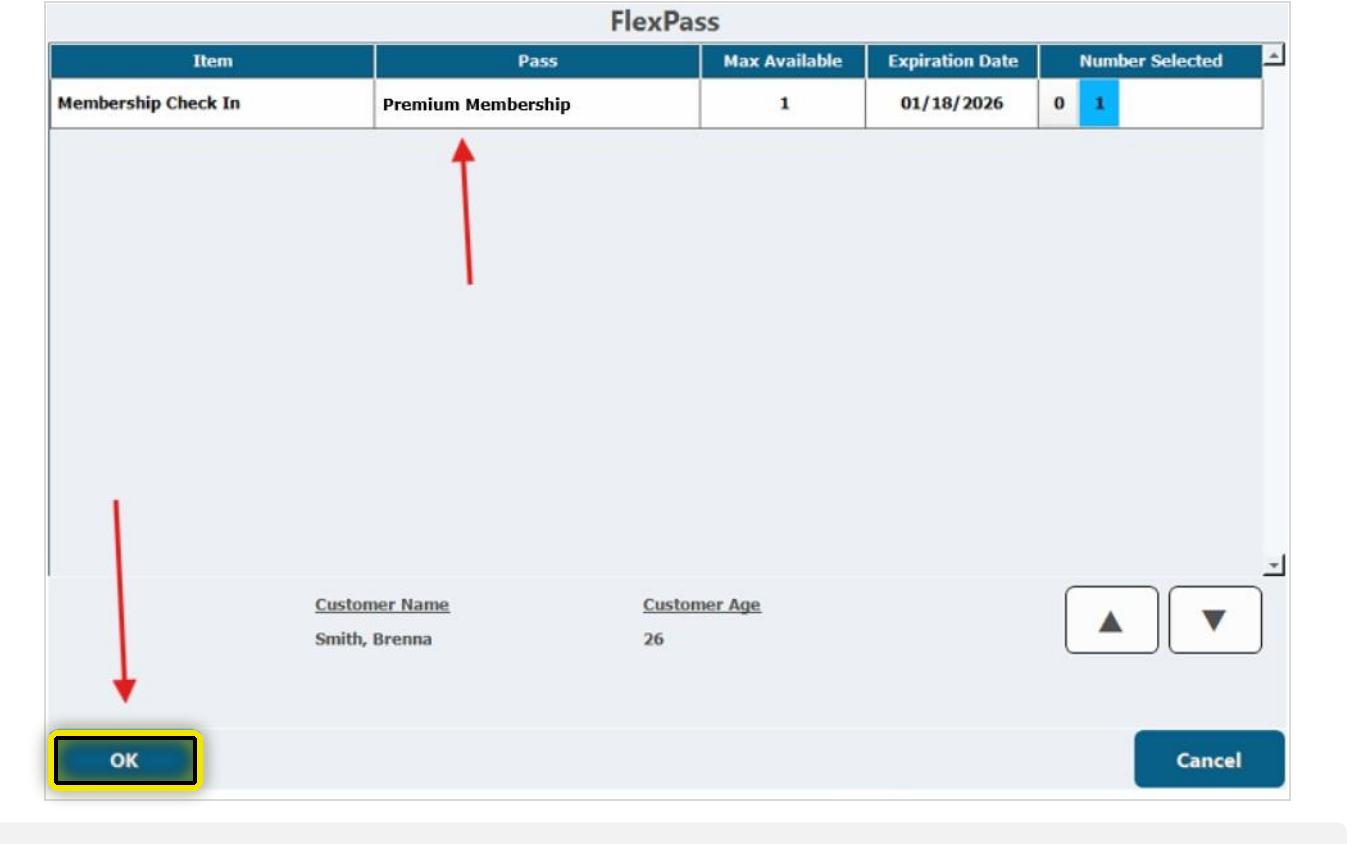
Verify Everything.
Accuracy Matters.
Select the waiver for the member who is actually checking in.
Confirm the membership belongs to that member.
Ask to see them. Members still need Launch socks.
Finish The
Member Check-In
After the membership pass is redeemed, verify the check-in ticket is zeroed out before completing the order.
Look For
$0.00
The Membership Check In ticket should show a zero-dollar total. This confirms the membership was applied correctly.
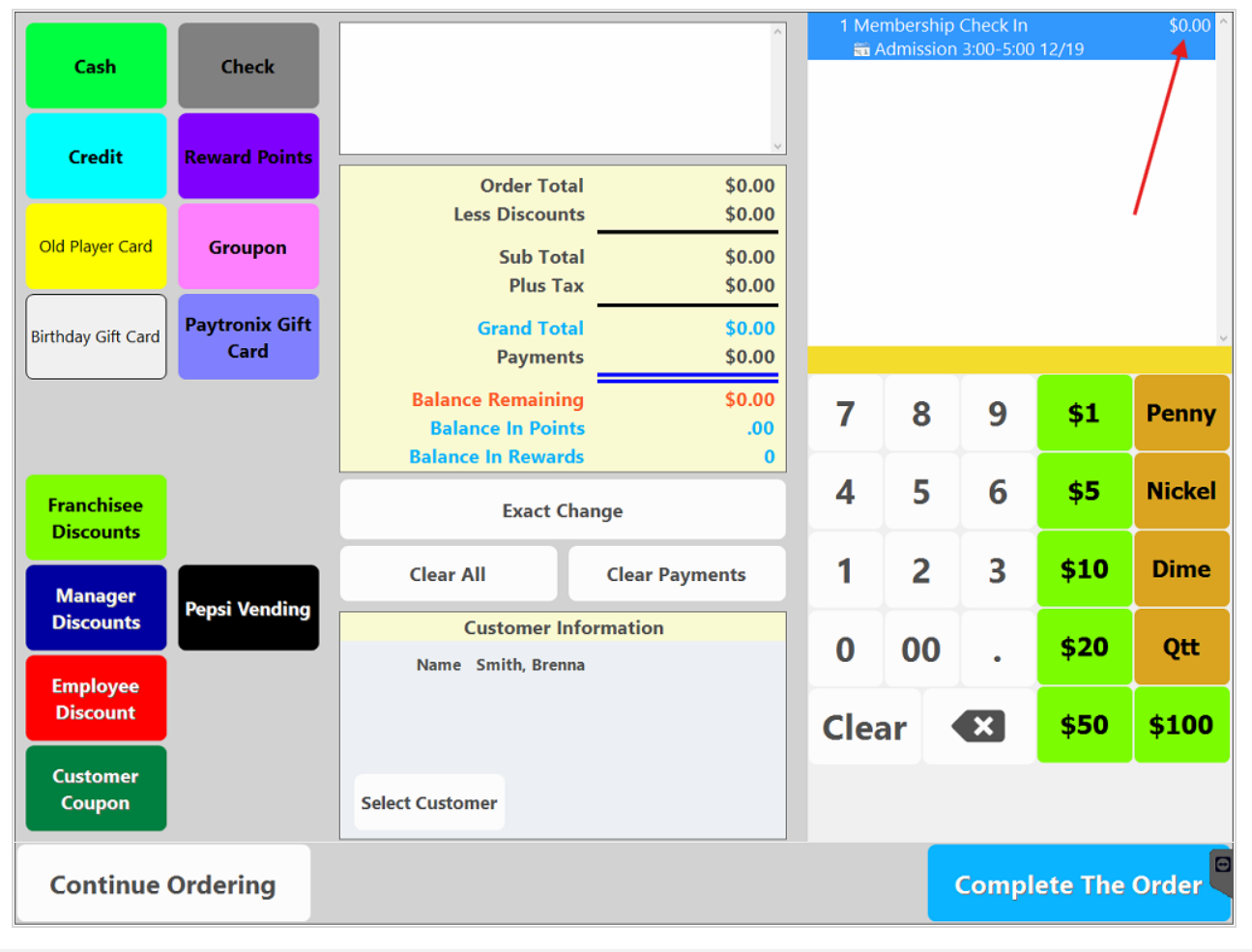
Verify The
Membership Applied.
Do not rush past the zero-dollar check. If the Membership Check In ticket does not zero out as expected, stop and get a manager before continuing.
Questions
You’ll Hear
Guests will have questions about the membership. Answer the common ones clearly, accurately, and without overcomplicating the conversation.
“How long is the membership?”
The membership is billed monthly. This is part of the agreement, but it does not need to become the entire focus of the sales conversation.
“Can my children share one?”
Memberships are assigned to the individual guest. Each person who wants membership access needs their own membership.
“What if we don’t come very often?”
Regular admission is $29.99. Membership is $19.99 per month, so the guest is already saving $10 today. Any future visit simply adds more value.
“What if I have a question about the terms?”
Tell the guest you want to confirm the correct answer, then get a manager to assist.
Answer What You Know.
Confirm What You Don’t.
Clear, accurate answers build trust. If you are not sure about a term or policy, get a manager before giving the guest an answer.
When The Guest
Hesitates
Not every guest will say yes right away. Handle concerns naturally without turning the conversation into a hard sell.
Hear The
Concern
Do not immediately argue against the objection. Let the guest know you heard what they said.
What Are They
Really Asking?
Is the concern how often they will visit, the recurring charge, the commitment, or something else?
Answer. Then
Give A Choice.
Use only the information you know, explain the value clearly, and let the guest decide.
Answer The Question.
Let The Guest Decide.
Explain the value, use accurate information, and never pressure the guest or invent an answer.
You’re Ready To
Make The Offer
You now have the information you need to explain and sell the Warwick membership with confidence.
Keep It
Simple
Use the same core behaviors every time you speak with an admission guest.
Save $10 Today
Every future visit simply adds even more value.
Do Not Guess.
Get A Manager.
Make sure the guest receives accurate information instead of an improvised answer.
Warwick
Membership Exam
Show that you understand the membership, the sales process, and the correct procedures for selling and redeeming it.